# 图片生成教程
> 全部文档的索引见 [llms.txt](https://ark.volcengine.com/llms.txt);在任一文档页面地址后追加 `.md` 可获取该页的 Markdown 版本。
Doubao Seedream 系列模型支持文本、单图和多图输入,可用于文生图、多图融合和图像编辑。本文介绍如何调用 [Image generation API](/docs/image-generation-api) 进行图像创作。如需切换模型,请根据下方模型能力表选择,并按目标模型的参数约束配置请求。
> **注意:新模型上线**
>
> Seedream 5.5(Model ID:`doubao-seedream-5-5-261028`)增强了多轮编辑一致性,支持通过文生图和图生图生成原生 RGBA 图片。图层拆分最多可输出 1 张底图和 99 个图层,并可为规整文字图层提供富文本 OCR 结果。
>
> 特色能力及调用示例请参见 [Doubao Seedream 5.5 教程](/docs/seedream-5-5)。
# 模型效果
更多效果示例见 [效果预览](https://ark.volcengine.com/region:cn-beijing/model/detail?Id=doubao-seedream-5-5)。
|场景 |输入 |输出 |
|---|---|---|
|图层拆分 |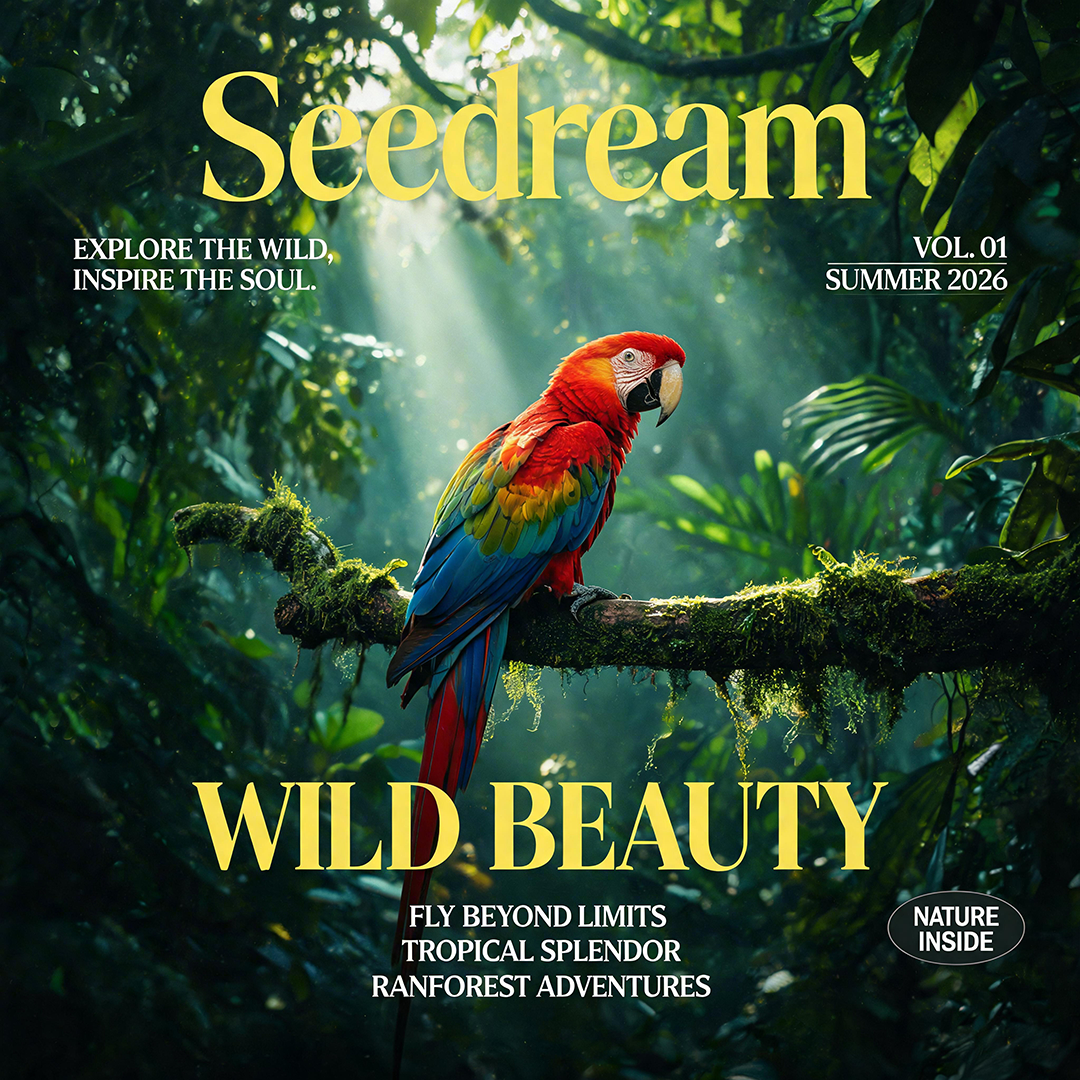 |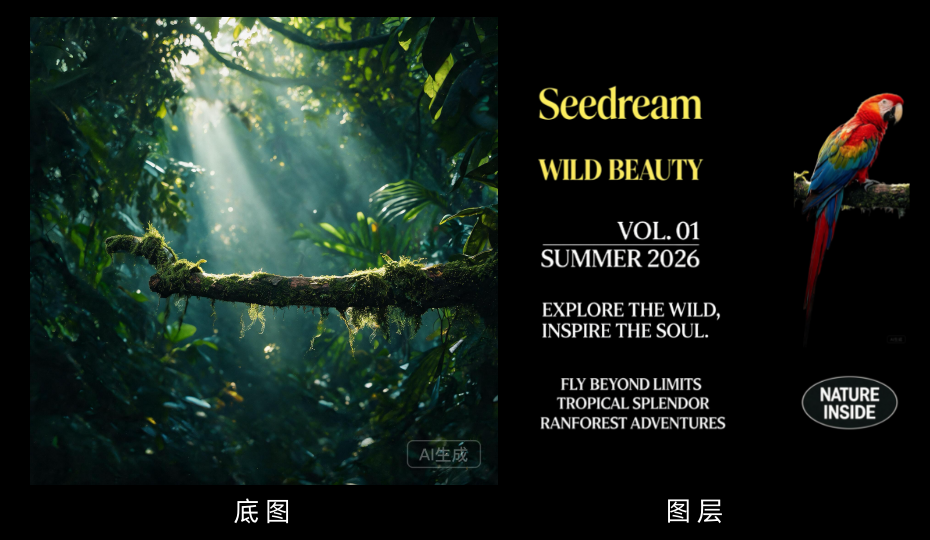 | \
|> Seedream 5.5、Seedream 5.0 pro / flash 支持将元素拆分为可独立编辑的图层,便于后续拖拽、缩放、重组等精细化编辑。下图展示 Seedream 5.0 pro 的拆分效果。 | | | \
| |> 将图片进行精确图层分离,需分离的文字坐标为 `180 64 812 198`、`757 210 939 280`、`63 212 320 282`、`178 714 826 810`、`814 819 949 894`、`326 824 669 930`;鹦鹉的坐标为 `347 305 642 997`。 | |
|交互编辑 |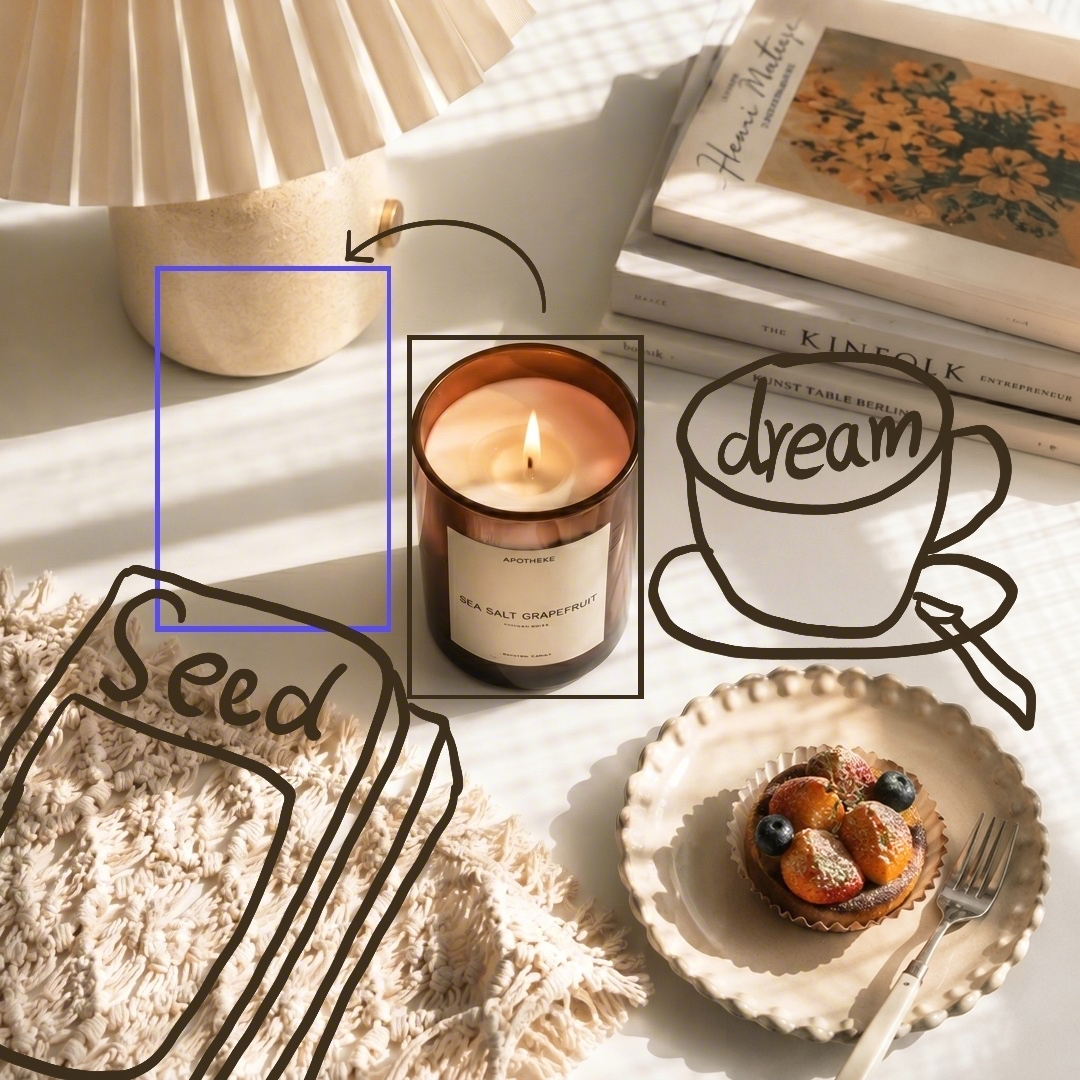 | | \
|> Seedream 5.5、Seedream 5.0 pro / flash 支持通过标记指定编辑区域,模型识别标记范围并生成内容,自然融入原有场景。下图展示 Seedream 5.0 pro 的编辑效果。 | | | \
| |> 根据手绘草图对图像进行编辑。在左下角标记区域添加一叠真实的杂志或艺术画册,并在右侧标记区域添加一个带杯碟的陶瓷杯咖啡。移除所有草图线条。保持构图不变。 | |
|多参考图生图 |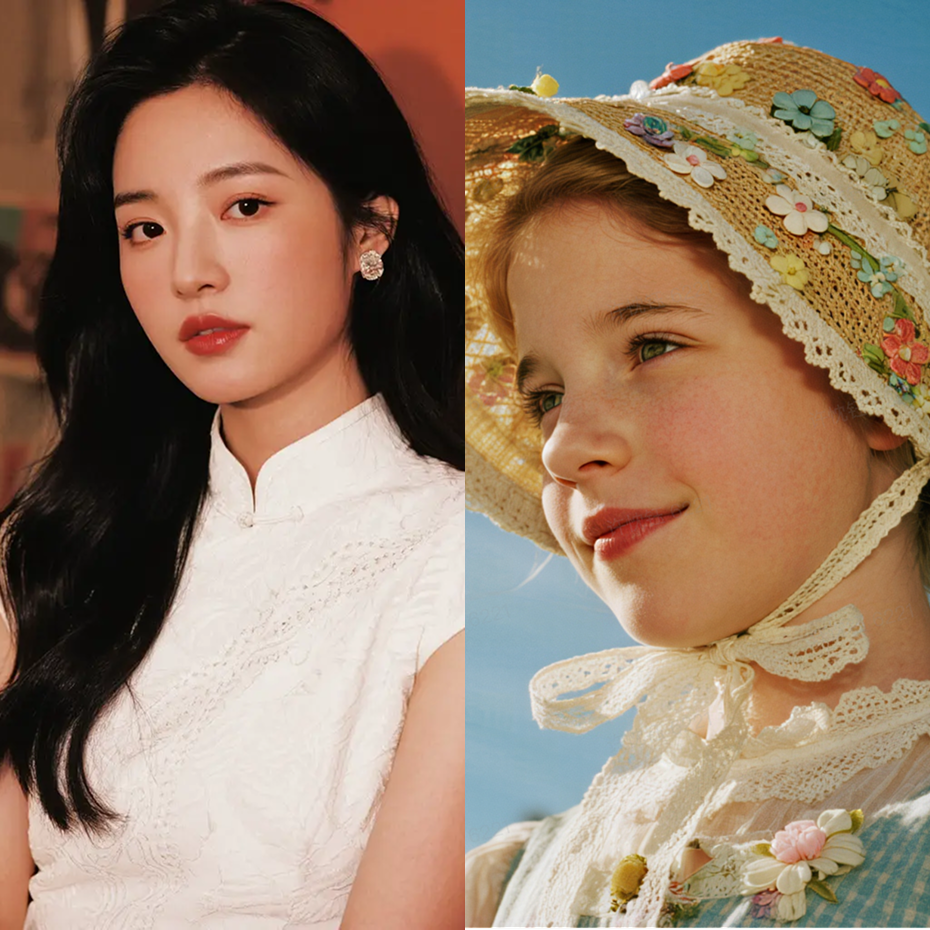 |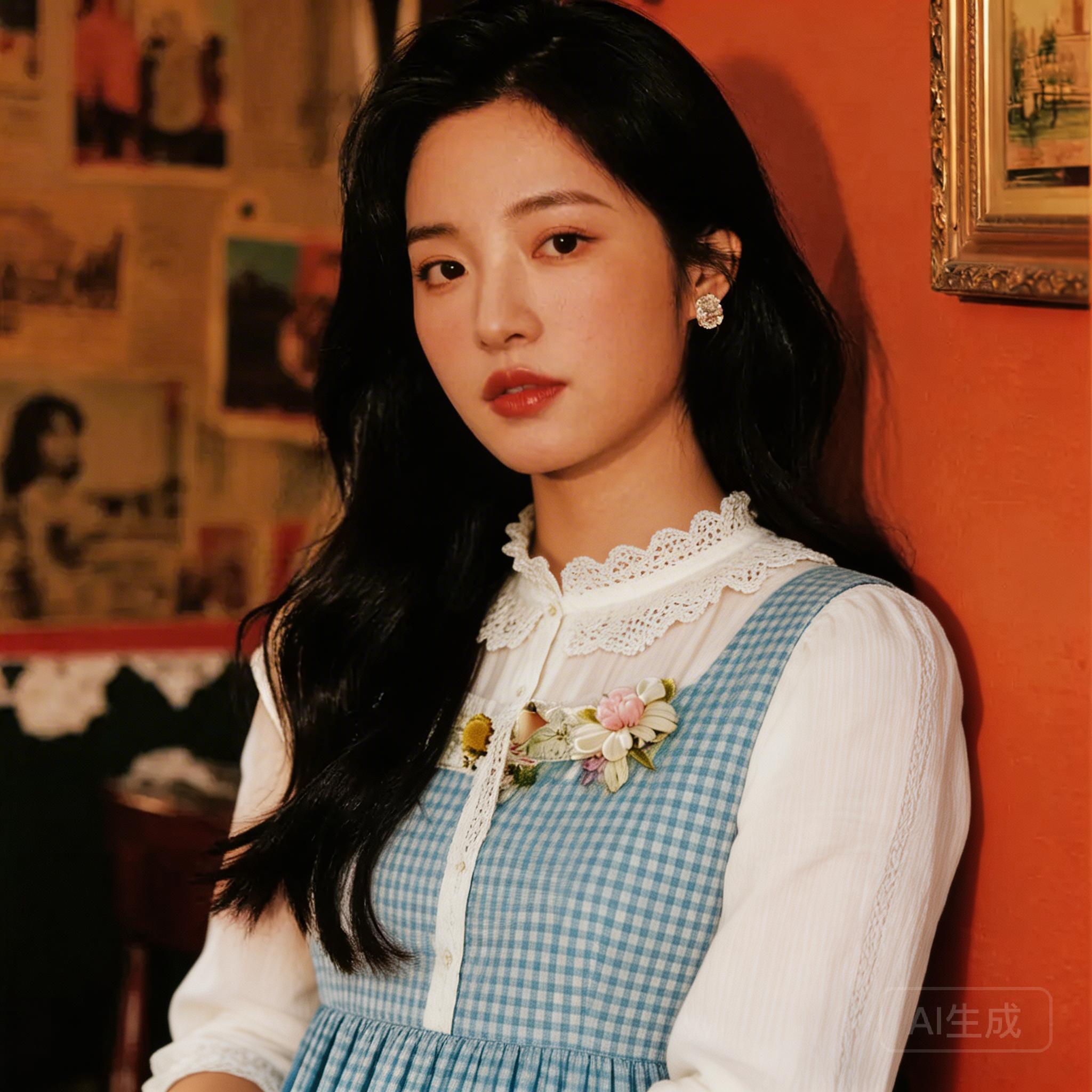 | \
|> 输入多张参考图,融合它们的风格、元素等特征来生成新图像。 | | | \
| |> 将图1的服装换为图2的服装 | |
|组图生成 | |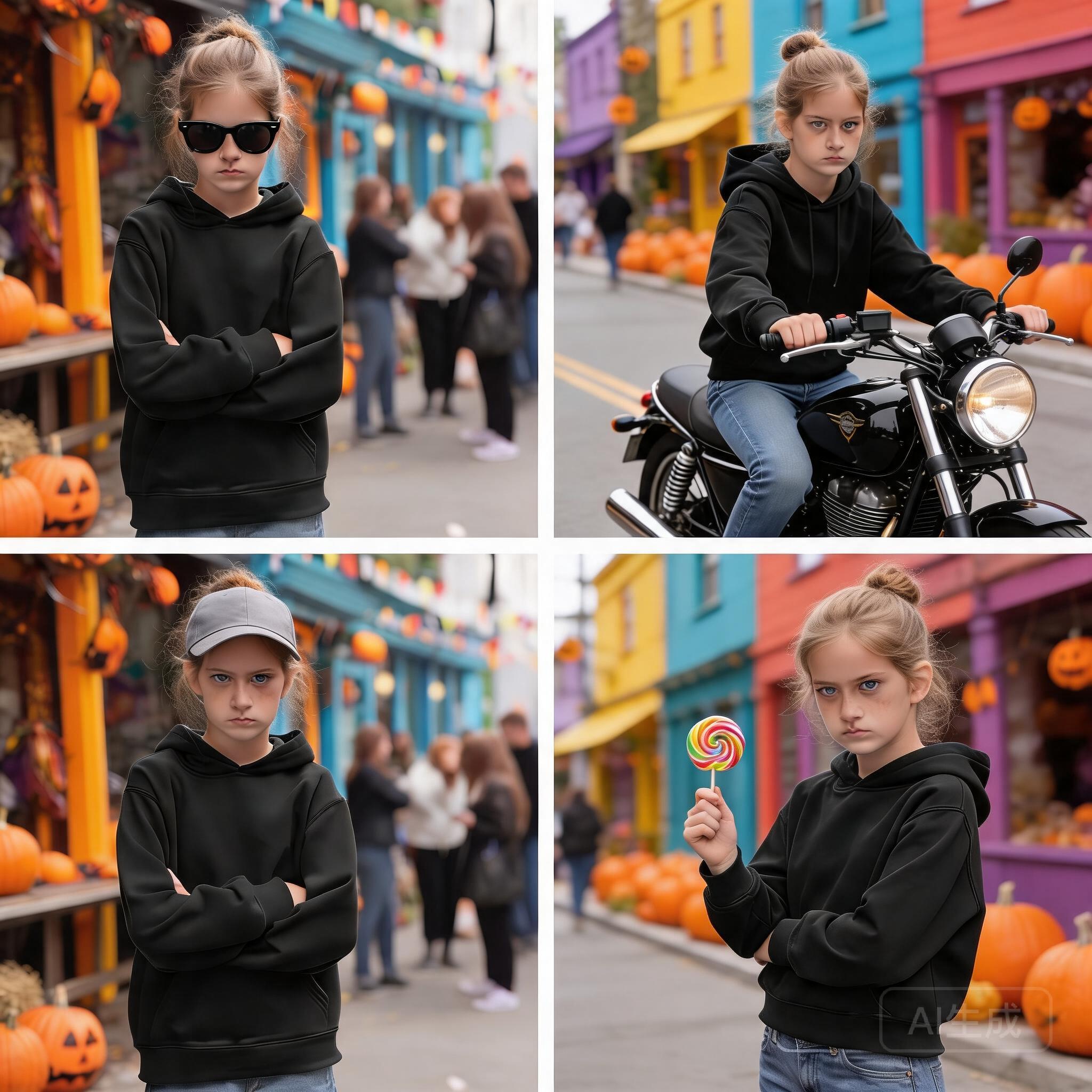 | \
|> Seedream 4.0 支持基于用户输入的文字和图片,生成一组内容关联的图像。 | | | \
| |> 参考图1,生成四图片,图中人物分别带着墨镜,骑着摩托,带着帽子,拿着棒棒糖 | |
# 模型能力
以下为 Seedream 系列各版本模型的能力与参数对比,帮助您根据业务需求选择合适的模型。
|模型名称 ||[Seedream 5.5](https://ark.volcengine.com/region:cn-beijing/model/detail?Id=doubao-seedream-5-5) |[Seedream 5.0 pro](https://ark.volcengine.com/region:cn-beijing/model/detail?Id=doubao-seedream-5-0-pro) |[Seedream 5.0 flash](https://ark.volcengine.com/region:cn-beijing/model/detail?Id=doubao-seedream-5-0-flash) |[Seedream 4.0](https://ark.volcengine.com/region:cn-beijing/model/detail?Id=doubao-seedream-4-0) |
|---|---|---|---|---|---|
|模型 ID (Model ID) ||doubao-seedream-5-5-261028 |doubao-seedream-5-0-pro-260628 |doubao-seedream-5-0-flash-260915 |doubao-seedream-4-0-260415(同时支持:doubao-seedream-4-0-20260415) |
|[文生图](/docs/image-generation-tutorial#9695d195) ||● |● |● |● |
|[文生组图](/docs/image-generation-tutorial#ec79cfda) ||— |— |— |● |
|[单 / 多图生图](/docs/image-generation-tutorial#8bc49063) ||●,最多输入 10 张参考图 |●,最多输入 10 张参考图 |●,最多输入 10 张参考图 |●,最多输入 14 张参考图 |
|[单 / 多图生组图](/docs/image-generation-tutorial#fc9f85e4) ||— |— |— |● |
|[交互编辑](#interactive_edit) ||● |● |● |— |
|[图层拆分](/docs/seedream-5-0-pro#layer_decomposition) ||● |● |● |— |
|[原生 RGBA 图片](/docs/seedream-5-5#native-rgba) ||●,支持文生图和图生图 |●,仅支持单张透明 PNG 图生图 |●,仅支持单张透明 PNG 图生图 |— |
|[富文本 OCR](/docs/seedream-5-5#rich-text-ocr) ||● |— |— |— |
|[流式输出](/docs/image-generation-tutorial#e5bef0d7) ||— |— |— |● |
|模型参数 |分辨率图片生成
|* 方式 1:指定分辨率档位:`1K`、`1.5K`、`2K` |* 方式 1:指定分辨率档位:`1K`、`1.5K`、`2K` |* 方式 1:指定分辨率档位:`1K`、`1.5K`、`2K` |* 方式 1:指定分辨率档位:`1K`、`2K`、`4K` | \
| | |* 方式 2:指定宽高像素值:[`1280x720`, `2880x2880`] |* 方式 2:指定宽高像素值:[`1280x720`, `2048x2048x1.1025`] |* 方式 2:指定宽高像素值:[`1280x720`, `2048x2048x1.1025`] |* 方式 2:指定宽高像素值:[`1280x720`, `4096x4096`] |
|^^| | | | | | \
| |分辨率图层拆分
|1K、1.5K、2K、auto |1K、1.5K、2K、auto |1K、1.5K、2K、auto |— |
|^^| | | | | | \
| |输出格式 |png、jpeg |png、jpeg |png、jpeg |jpeg |
|^^| | | | | | \
| |提示词优化模式 |标准模式 |标准模式、极速模式 |标准模式 |标准模式、极速模式 |
|^^| | | | | | \
| |生成数量 |单图;图层拆分最多 1 张底图 + 99 个图层 |支持生成单图/多个图层(1 张底图 + 最多 16 个图层) |支持生成单图/多个图层(1 张底图 + 最多 16 个图层) |输入的参考图数量 + 最终生成的图片数量 ≤ 15张 |
|^^| | | | | | \
| |最大输出图片数图层拆分
|2–100 张(包含底图) |— |— |— |
|限流 IPM(张 / 分钟) ||500 |500 |500 |500 |
# 快速体验
您可在火山方舟平台 API Explorer,快速体验图片生成功能,支持自定义参数(例如设置图片水印、控制输出图片大小等),方便您直观感受其效果和性能。
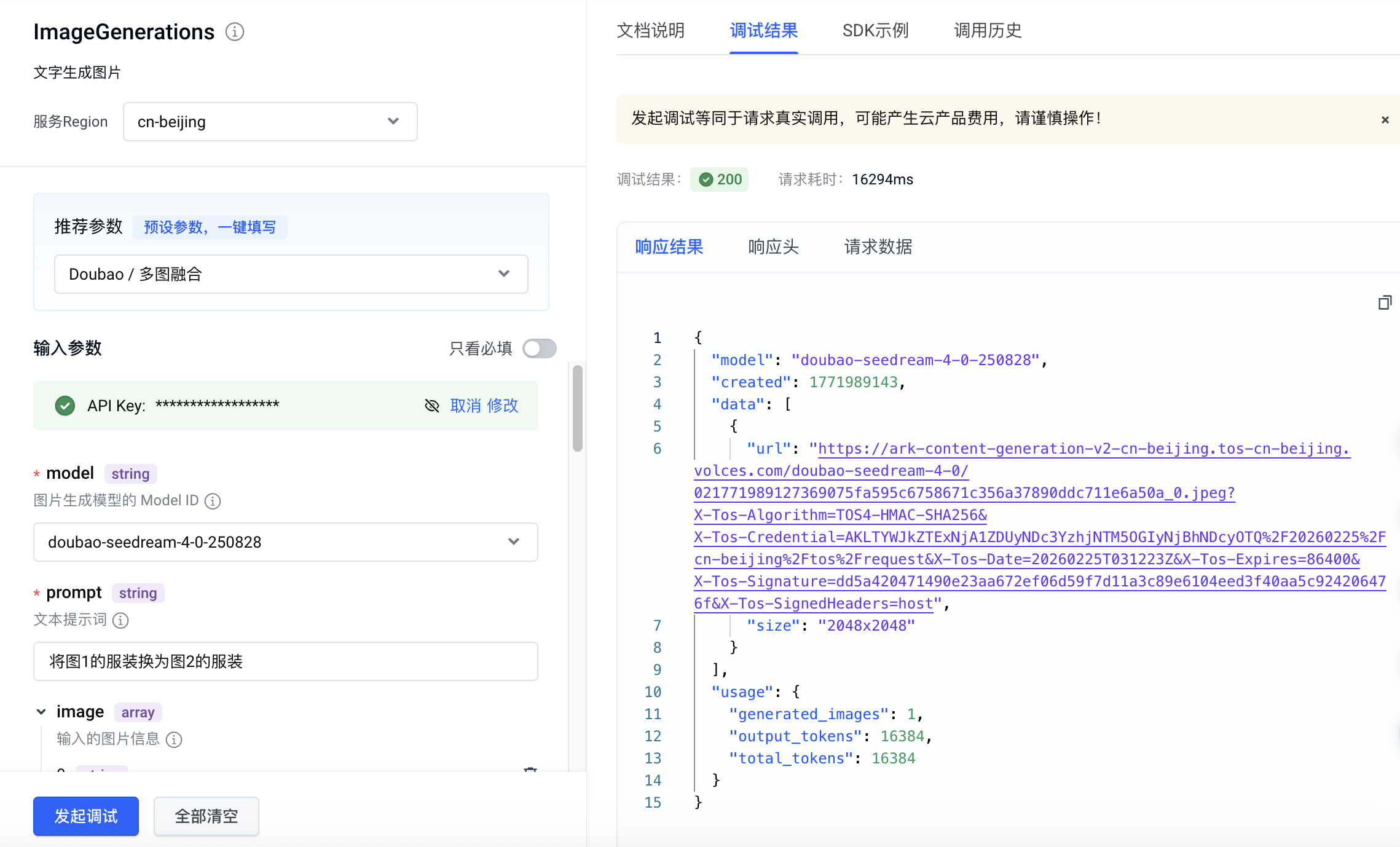
# 基础使用
## 文生图(纯文本输入单图输出)
通过给模型提供清晰准确的文字指令,即可快速获得符合描述的高质量单张图片。
|提示词 |输出 |
|---|---|
|充满活力的特写编辑肖像,模特眼神犀利,头戴雕塑感帽子,色彩拼接丰富,眼部焦点锐利,景深较浅,具有 Vogue 杂志封面的美学风格,采用中画幅拍摄,工作室灯光效果强烈。 |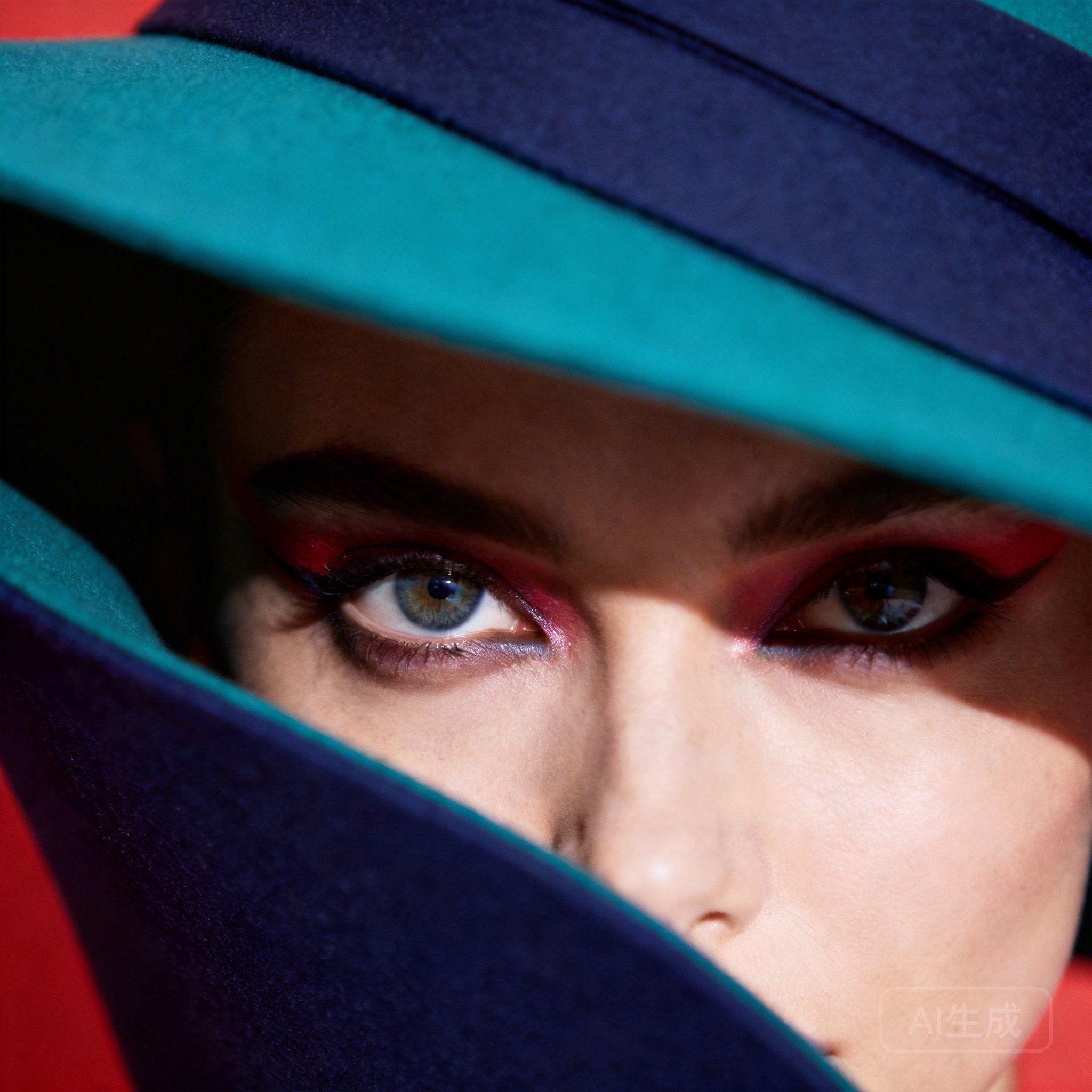 |
**选项:Curl**
```Bash
curl https://ark.cn-beijing.volces.com/api/v3/images/generations \
-H "Content-Type: application/json" \
-H "Authorization: Bearer $ARK_API_KEY" \
-d '{
"model": "doubao-seedream-5-5-261028",
"prompt": "充满活力的特写编辑肖像,模特眼神犀利,头戴雕塑感帽子,色彩拼接丰富,眼部焦点锐利,景深较浅,具有Vogue杂志封面的美学风格,采用中画幅拍摄,工作室灯光效果强烈。",
"size": "2K",
"output_format":"png",
"watermark": true
}'
```
**选项:Python**
```Python
import os
# Install SDK: python -m pip install --upgrade arkruntime
from arkruntime import Ark
client = Ark(
# The base URL for model invocation
base_url="https://ark.cn-beijing.volces.com/api/v3",
# Get API Key: https://ark.volcengine.com/region:cn-beijing/apikey
api_key=os.getenv('ARK_API_KEY'),
)
imagesResponse = client.images.generate(
# Replace with Model ID
model="doubao-seedream-5-5-261028",
prompt="充满活力的特写编辑肖像,模特眼神犀利,头戴雕塑感帽子,色彩拼接丰富,眼部焦点锐利,景深较浅,具有Vogue杂志封面的美学风格,采用中画幅拍摄,工作室灯光效果强烈。",
size="2K",
output_format="png",
response_format="url",
watermark=True
)
print(imagesResponse.data[0].url)
```
**选项:Java**
```Java
package com.ark.sample;
import com.volcengine.ark.runtime.models.images.*;
import com.volcengine.ark.runtime.service.ArkService;
import okhttp3.ConnectionPool;
import okhttp3.Dispatcher;
import java.util.Arrays;
import java.util.List;
import java.util.concurrent.TimeUnit;
public class ImageGenerationsExample {
public static void main(String[] args) {
// Get API Key: https://ark.volcengine.com/region:cn-beijing/apikey
String apiKey = System.getenv("ARK_API_KEY");
ConnectionPool connectionPool = new ConnectionPool(5, 1, TimeUnit.SECONDS);
Dispatcher dispatcher = new Dispatcher();
ArkService service = ArkService.builder()
.baseUrl("https://ark.cn-beijing.volces.com/api/v3")
// The base URL for model invocation
.dispatcher(dispatcher)
.connectionPool(connectionPool)
.apiKey(apiKey)
.build();
CreateImageGenerationRequest generateRequest = CreateImageGenerationRequest.builder()
.model("doubao-seedream-5-5-261028") // Replace with Model ID
.prompt("充满活力的特写编辑肖像,模特眼神犀利,头戴雕塑感帽子,色彩拼接丰富,眼部焦点锐利,景深较浅,具有Vogue杂志封面的美学风格,采用中画幅拍摄,工作室灯光效果强烈。")
.size("2K")
.outputFormat(OutputFormat.PNG)
.responseFormat(ResponseFormat.URL)
.watermark(true)
.build();
ImageGenerationResponse imagesResponse = service.generateImages(generateRequest);
System.out.println(imagesResponse.getData().get(0).getUrl());
service.shutdownExecutor();
}
}
```
**选项:Go**
```Go
package main
import (
"context"
"fmt"
"os"
"github.com/volcengine/ark-runtime-go/arkruntime"
model "github.com/volcengine/ark-runtime-go/arkruntime/model/images"
)
func main() {
client := arkruntime.NewClientWithApiKey(
// Get API Key: https://ark.volcengine.com/region:cn-beijing/apikey
os.Getenv("ARK_API_KEY"),
// The base URL for model invocation
arkruntime.WithBaseUrl("https://ark.cn-beijing.volces.com/api/v3"),
)
ctx := context.Background()
outputFormat := model.OutputFormatPNG
generateReq := &model.CreateImageGenerationRequest{
Model: "doubao-seedream-5-5-261028", // Replace with Model ID
Prompt: model.NewOptString("充满活力的特写编辑肖像,模特眼神犀利,头戴雕塑感帽子,色彩拼接丰富,眼部焦点锐利,景深较浅,具有Vogue杂志封面的美学风格,采用中画幅拍摄,工作室灯光效果强烈。"),
Size: model.NewOptString("2K"),
OutputFormat: model.NewOptOutputFormat(outputFormat),
ResponseFormat: model.NewOptResponseFormat(model.ResponseFormatURL),
Watermark: model.NewOptBool(true),
}
imagesResponse, err := client.GenerateImages(ctx, generateReq)
if err != nil {
fmt.Printf("generate images error: %v\n", err)
return
}
fmt.Printf("%s\n", imagesResponse.Data[0].URL.Or(""))
}
```
**选项:OpenAI**
```Python
import os
from openai import OpenAI
client = OpenAI(
# The base URL for model invocation
base_url="https://ark.cn-beijing.volces.com/api/v3",
# Get API Key: https://ark.volcengine.com/region:cn-beijing/apikey
api_key=os.getenv('ARK_API_KEY'),
)
imagesResponse = client.images.generate(
# Replace with Model ID
model="doubao-seedream-5-5-261028",
prompt="充满活力的特写编辑肖像,模特眼神犀利,头戴雕塑感帽子,色彩拼接丰富,眼部焦点锐利,景深较浅,具有Vogue杂志封面的美学风格,采用中画幅拍摄,工作室灯光效果强烈。",
size="2K",
output_format="png",
response_format="url",
extra_body={
"watermark": True,
},
)
print(imagesResponse.data[0].url)
```
## 图文生图(单图输入单图输出)
基于已有图片,结合文字指令进行图像编辑,包括图像元素增删、风格转化、材质替换、色调迁移、改变背景/视角/尺寸等。
|提示词 |输入图 |输出 |
|---|---|---|
|保持模特姿势和液态服装的流动形状不变。将服装材质从银色金属改为完全透明的清水(或玻璃)。透过液态水流,可以看到模特的皮肤细节。光影从反射变为折射。 |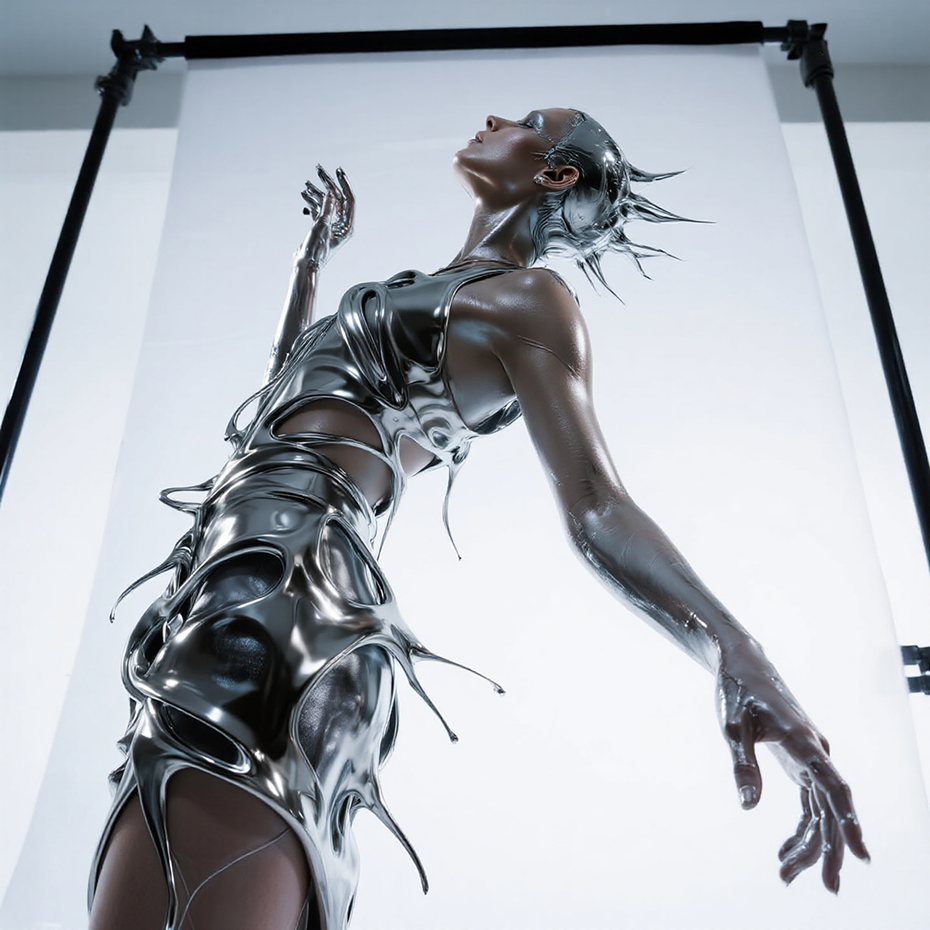 |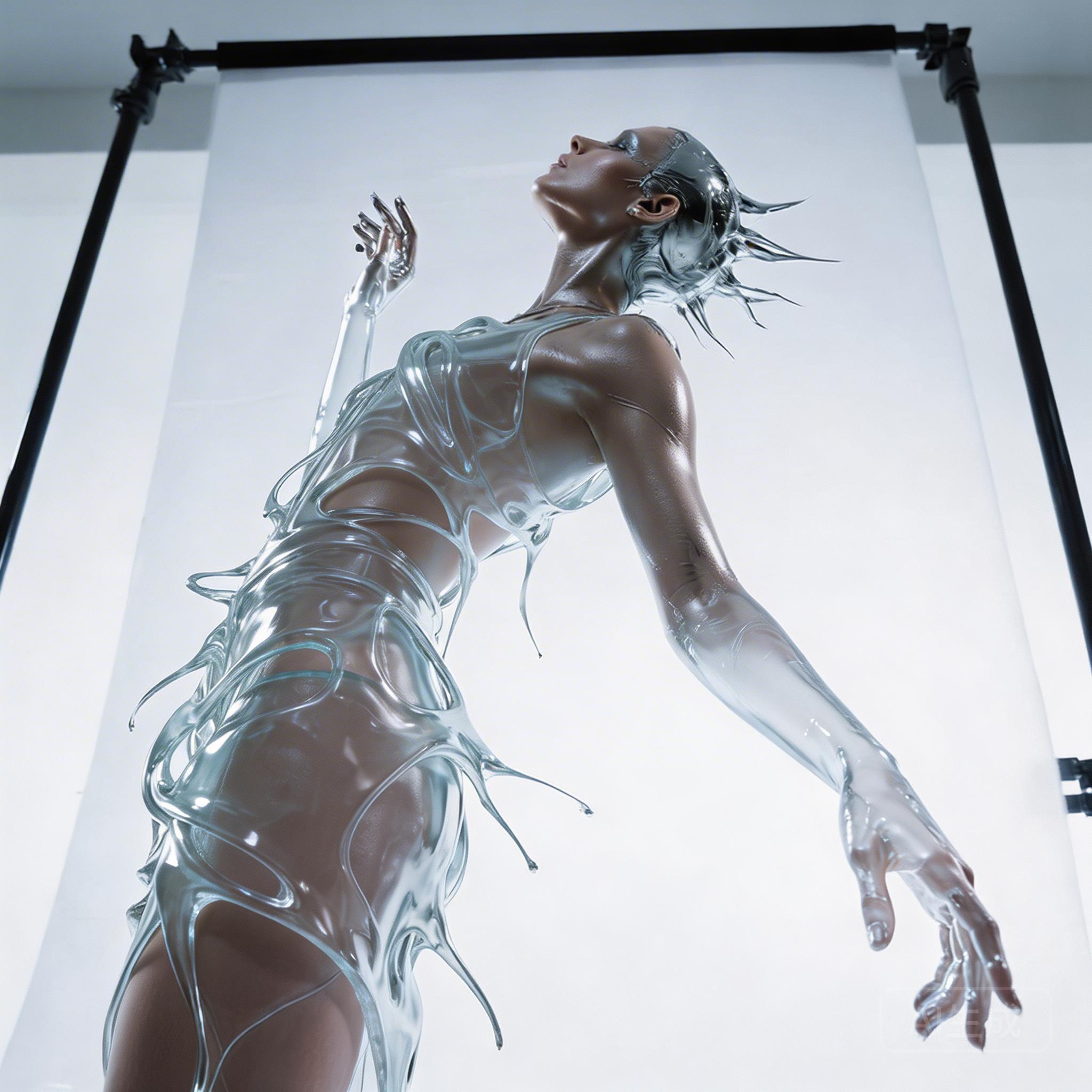 |
**选项:Curl**
```Bash
curl https://ark.cn-beijing.volces.com/api/v3/images/generations \
-H "Content-Type: application/json" \
-H "Authorization: Bearer $ARK_API_KEY" \
-d '{
"model": "doubao-seedream-5-5-261028",
"prompt": "保持模特姿势和液态服装的流动形状不变。将服装材质从银色金属改为完全透明的清水(或玻璃)。透过液态水流,可以看到模特的皮肤细节。光影从反射变为折射。",
"image": "https://arkdocs.tos-cn-beijing.volces.com/images/image-generation/seedream4_5_imageToimage.png",
"size": "2K",
"output_format":"png",
"watermark": true
}'
```
**选项:Python**
```Python
import os
# Install SDK: python -m pip install --upgrade arkruntime
from arkruntime import Ark
client = Ark(
# The base URL for model invocation
base_url="https://ark.cn-beijing.volces.com/api/v3",
# Get API Key: https://ark.volcengine.com/region:cn-beijing/apikey
api_key=os.getenv('ARK_API_KEY'),
)
imagesResponse = client.images.generate(
# Replace with Model ID
model="doubao-seedream-5-5-261028",
prompt="保持模特姿势和液态服装的流动形状不变。将服装材质从银色金属改为完全透明的清水(或玻璃)。透过液态水流,可以看到模特的皮肤细节。光影从反射变为折射。",
image="https://arkdocs.tos-cn-beijing.volces.com/images/image-generation/seedream4_5_imageToimage.png",
size="2K",
output_format="png",
response_format="url",
watermark=True
)
print(imagesResponse.data[0].url)
```
**选项:Java**
```Java
package com.ark.sample;
import com.volcengine.ark.runtime.models.images.*;
import com.volcengine.ark.runtime.service.ArkService;
import okhttp3.ConnectionPool;
import okhttp3.Dispatcher;
import java.util.Arrays;
import java.util.List;
import java.util.concurrent.TimeUnit;
public class ImageGenerationsExample {
public static void main(String[] args) {
String apiKey = System.getenv("ARK_API_KEY");
ConnectionPool connectionPool = new ConnectionPool(5, 1, TimeUnit.SECONDS);
Dispatcher dispatcher = new Dispatcher();
ArkService service = ArkService.builder()
.baseUrl("https://ark.cn-beijing.volces.com/api/v3")
// The base URL for model invocation
.dispatcher(dispatcher)
.connectionPool(connectionPool)
.apiKey(apiKey)
.build();
// CreateImageGenerationRequestImage requires ark-runtime 0.6.0 or later.
CreateImageGenerationRequest generateRequest = CreateImageGenerationRequest.builder()
.model("doubao-seedream-5-5-261028") // Replace with Model ID
.prompt("保持模特姿势和液态服装的流动形状不变。将服装材质从银色金属改为完全透明的清水(或玻璃)。透过液态水流,可以看到模特的皮肤细节。光影从反射变为折射。")
.image(CreateImageGenerationRequestImage.ofString("https://arkdocs.tos-cn-beijing.volces.com/images/image-generation/seedream4_5_imageToimage.png"))
.size("2K")
.outputFormat(OutputFormat.PNG)
.responseFormat(ResponseFormat.URL)
.watermark(true)
.build();
ImageGenerationResponse imagesResponse = service.generateImages(generateRequest);
System.out.println(imagesResponse.getData().get(0).getUrl());
service.shutdownExecutor();
}
}
```
**选项:Go**
```Go
package main
import (
"context"
"fmt"
"os"
"github.com/volcengine/ark-runtime-go/arkruntime"
model "github.com/volcengine/ark-runtime-go/arkruntime/model/images"
)
func main() {
client := arkruntime.NewClientWithApiKey(
os.Getenv("ARK_API_KEY"),
// The base URL for model invocation
arkruntime.WithBaseUrl("https://ark.cn-beijing.volces.com/api/v3"),
)
ctx := context.Background()
outputFormat := model.OutputFormatPNG
generateReq := &model.CreateImageGenerationRequest{
Model: "doubao-seedream-5-5-261028",
Prompt: model.NewOptString("保持模特姿势和液态服装的流动形状不变。将服装材质从银色金属改为完全透明的清水(或玻璃)。透过液态水流,可以看到模特的皮肤细节。光影从反射变为折射。"),
Image: model.NewOptCreateImageGenerationRequestImage(model.NewStringArrayCreateImageGenerationRequestImage([]string{"https://arkdocs.tos-cn-beijing.volces.com/images/image-generation/seedream4_5_imageToimage.png"})),
Size: model.NewOptString("2K"),
OutputFormat: model.NewOptOutputFormat(outputFormat),
ResponseFormat: model.NewOptResponseFormat(model.ResponseFormatURL),
Watermark: model.NewOptBool(true),
}
imagesResponse, err := client.GenerateImages(ctx, generateReq)
if err != nil {
fmt.Printf("generate images error: %v\n", err)
return
}
fmt.Printf("%s\n", imagesResponse.Data[0].URL.Or(""))
}
```
**选项:OpenAI**
```Python
import os
from openai import OpenAI
client = OpenAI(
# The base URL for model invocation
base_url="https://ark.cn-beijing.volces.com/api/v3",
# Get API Key: https://ark.volcengine.com/region:cn-beijing/apikey
api_key=os.getenv('ARK_API_KEY'),
)
imagesResponse = client.images.generate(
model="doubao-seedream-5-5-261028",
prompt="保持模特姿势和液态服装的流动形状不变。将服装材质从银色金属改为完全透明的清水(或玻璃)。透过液态水流,可以看到模特的皮肤细节。光影从反射变为折射。",
size="2K",
output_format="png",
response_format="url",
extra_body = {
"image": "https://arkdocs.tos-cn-beijing.volces.com/images/image-generation/seedream4_5_imageToimage.png",
"watermark": True
}
)
print(imagesResponse.data[0].url)
```
## 多图融合(多图输入单图输出)
根据您输入的文本描述和多张参考图片,融合它们的风格、元素等特征来生成新图像。如衣裤鞋帽与模特图融合成穿搭图,人物与风景融合为人物风景图等。
|提示词 |输入图1 |输入图2 |输出 |
|---|---|---|---|
|将图1的服装换为图2的服装 |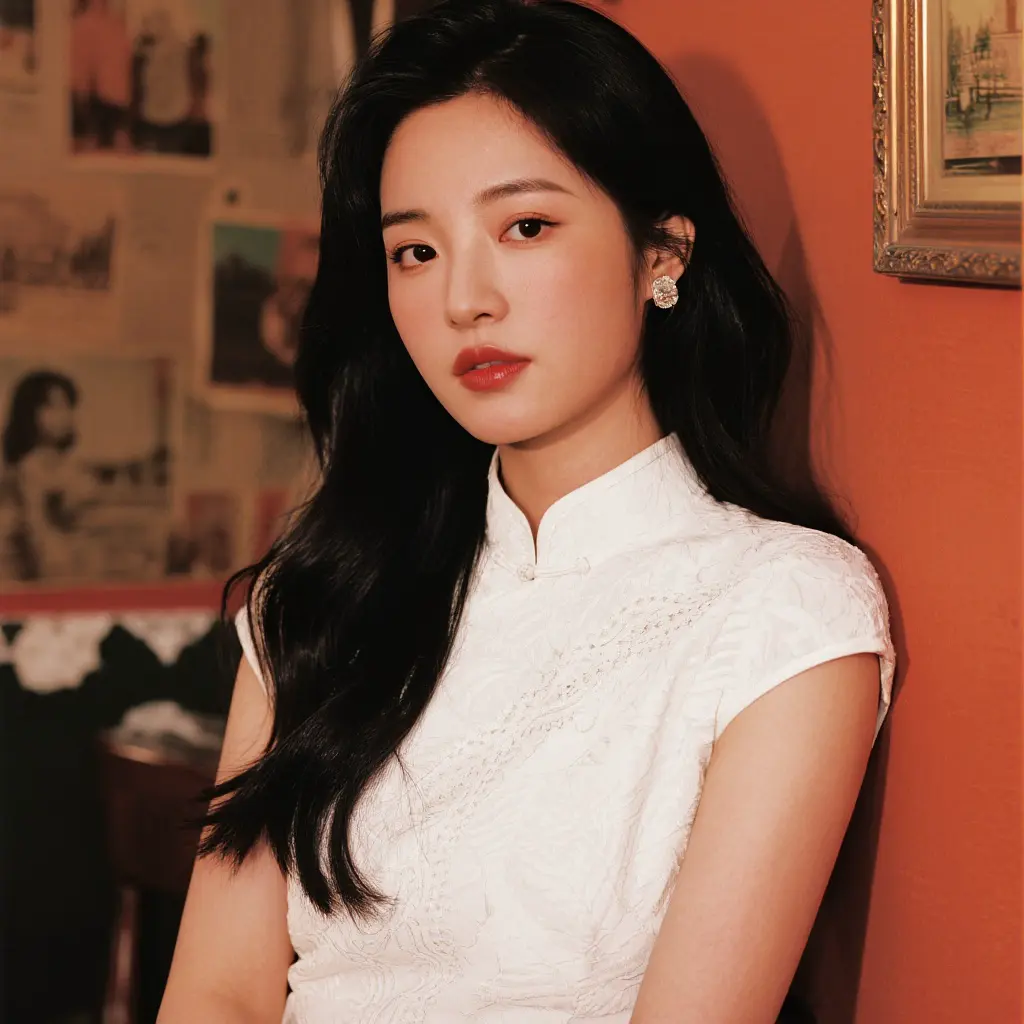 |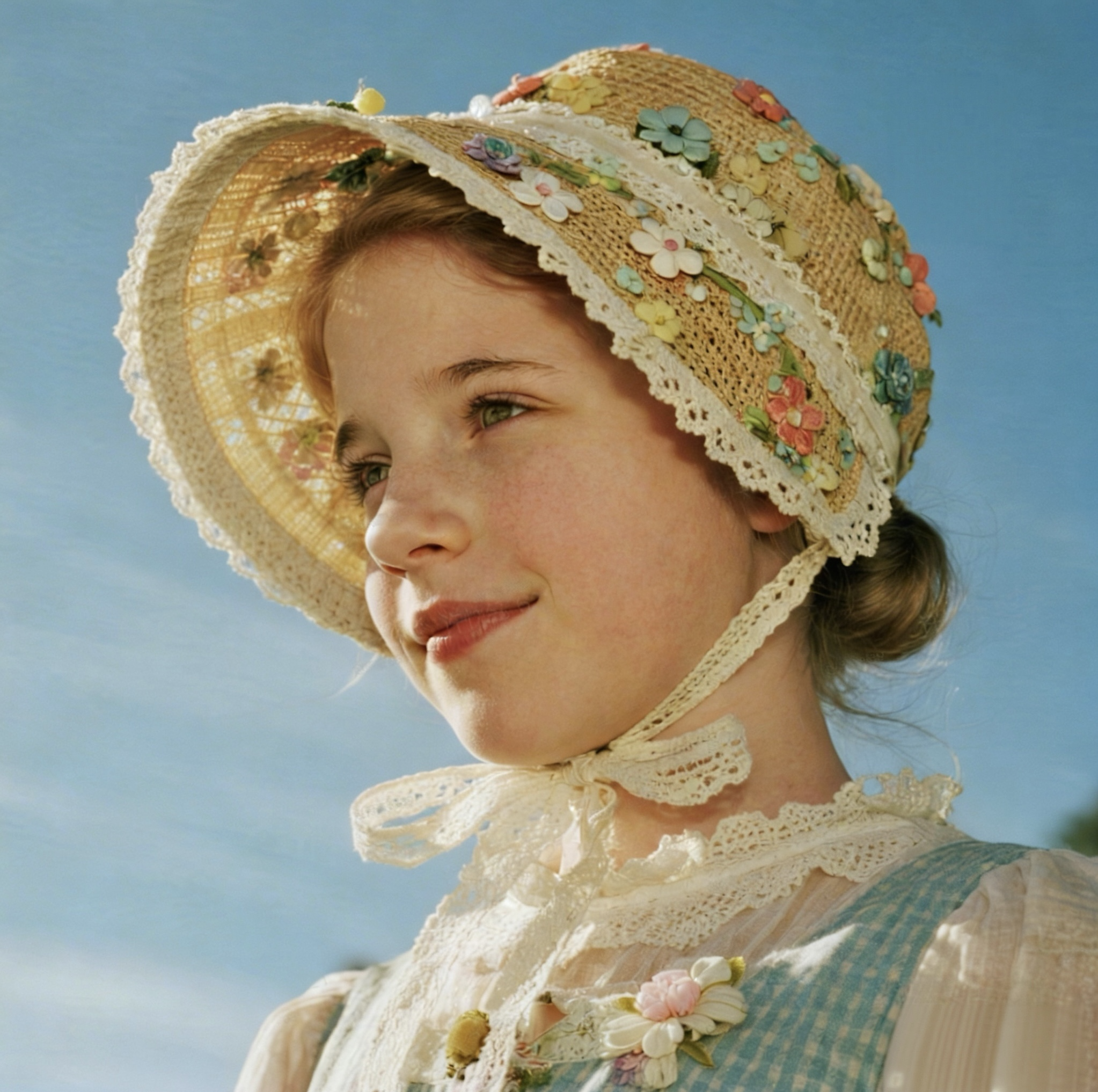 | |
**选项:Curl**
```Bash
curl https://ark.cn-beijing.volces.com/api/v3/images/generations \
-H "Content-Type: application/json" \
-H "Authorization: Bearer $ARK_API_KEY" \
-d '{
"model": "doubao-seedream-5-5-261028",
"prompt": "将图1的服装换为图2的服装",
"image": ["https://arkdocs.tos-cn-beijing.volces.com/images/image-generation/seedream4_imagesToimage_1.png", "https://arkdocs.tos-cn-beijing.volces.com/images/image-generation/seedream4_5_imagesToimage_2.png"],
"size": "2K",
"output_format":"png",
"watermark": true
}'
```
**选项:Python**
```Python
import os
# Install SDK: python -m pip install --upgrade arkruntime
from arkruntime import Ark
client = Ark(
# The base URL for model invocation
base_url="https://ark.cn-beijing.volces.com/api/v3",
# Get API Key: https://ark.volcengine.com/region:cn-beijing/apikey
api_key=os.getenv('ARK_API_KEY'),
)
imagesResponse = client.images.generate(
# Replace with Model ID
model="doubao-seedream-5-5-261028",
prompt="将图1的服装换为图2的服装",
image=["https://arkdocs.tos-cn-beijing.volces.com/images/image-generation/seedream4_imagesToimage_1.png", "https://arkdocs.tos-cn-beijing.volces.com/images/image-generation/seedream4_5_imagesToimage_2.png"],
size="2K",
output_format="png",
response_format="url",
watermark=True
)
print(imagesResponse.data[0].url)
```
**选项:Java**
```Java
package com.ark.sample;
import com.volcengine.ark.runtime.models.images.*;
import com.volcengine.ark.runtime.service.ArkService;
import okhttp3.ConnectionPool;
import okhttp3.Dispatcher;
import java.util.Arrays;
import java.util.List;
import java.util.concurrent.TimeUnit;
public class ImageGenerationsExample {
public static void main(String[] args) {
String apiKey = System.getenv("ARK_API_KEY");
ConnectionPool connectionPool = new ConnectionPool(5, 1, TimeUnit.SECONDS);
Dispatcher dispatcher = new Dispatcher();
ArkService service = ArkService.builder()
.baseUrl("https://ark.cn-beijing.volces.com/api/v3")
// The base URL for model invocation
.dispatcher(dispatcher)
.connectionPool(connectionPool)
.apiKey(apiKey)
.build();
// CreateImageGenerationRequestImage requires ark-runtime 0.6.0 or later.
CreateImageGenerationRequest generateRequest = CreateImageGenerationRequest.builder()
.model("doubao-seedream-5-5-261028") // Replace with Model ID
.prompt("将图1的服装换为图2的服装")
.image(CreateImageGenerationRequestImage.ofList(Arrays.asList(
"https://arkdocs.tos-cn-beijing.volces.com/images/image-generation/seedream4_imagesToimage_1.png",
"https://arkdocs.tos-cn-beijing.volces.com/images/image-generation/seedream4_5_imagesToimage_2.png"
)))
.size("2K")
.outputFormat(OutputFormat.PNG)
.responseFormat(ResponseFormat.URL)
.watermark(true)
.build();
ImageGenerationResponse imagesResponse = service.generateImages(generateRequest);
System.out.println(imagesResponse.getData().get(0).getUrl());
service.shutdownExecutor();
}
}
```
**选项:Go**
```Go
package main
import (
"context"
"fmt"
"os"
"github.com/volcengine/ark-runtime-go/arkruntime"
model "github.com/volcengine/ark-runtime-go/arkruntime/model/images"
)
func main() {
client := arkruntime.NewClientWithApiKey(
os.Getenv("ARK_API_KEY"),
// The base URL for model invocation
arkruntime.WithBaseUrl("https://ark.cn-beijing.volces.com/api/v3"),
)
ctx := context.Background()
outputFormat := model.OutputFormatPNG
generateReq := &model.CreateImageGenerationRequest{
Model: "doubao-seedream-5-5-261028",
Prompt: model.NewOptString("将图1的服装换为图2的服装"),
Image: model.NewOptCreateImageGenerationRequestImage(model.NewStringArrayCreateImageGenerationRequestImage([]string{
"https://arkdocs.tos-cn-beijing.volces.com/images/image-generation/seedream4_imagesToimage_1.png",
"https://arkdocs.tos-cn-beijing.volces.com/images/image-generation/seedream4_5_imagesToimage_2.png",
})),
Size: model.NewOptString("2K"),
OutputFormat: model.NewOptOutputFormat(outputFormat),
ResponseFormat: model.NewOptResponseFormat(model.ResponseFormatURL),
Watermark: model.NewOptBool(true),
}
imagesResponse, err := client.GenerateImages(ctx, generateReq)
if err != nil {
fmt.Printf("generate images error: %v\n", err)
return
}
fmt.Printf("%s\n", imagesResponse.Data[0].URL.Or(""))
}
```
**选项:OpenAI**
```Python
import os
from openai import OpenAI
client = OpenAI(
# The base URL for model invocation
base_url="https://ark.cn-beijing.volces.com/api/v3",
# Get API Key: https://ark.volcengine.com/region:cn-beijing/apikey
api_key=os.getenv('ARK_API_KEY'),
)
imagesResponse = client.images.generate(
model="doubao-seedream-5-5-261028",
prompt="将图1的服装换为图2的服装",
size="2K",
output_format="png",
response_format="url",
extra_body = {
"image": ["https://arkdocs.tos-cn-beijing.volces.com/images/image-generation/seedream4_imagesToimage_1.png", "https://arkdocs.tos-cn-beijing.volces.com/images/image-generation/seedream4_5_imagesToimage_2.png"],
"watermark": True,
}
)
print(imagesResponse.data[0].url)
```
## 组图输出(多图输出)
> 仅 Seedream 4.0 支持。
支持通过一张或者多张图片和文字信息,生成漫画分镜、品牌视觉等一组内容关联的图片。
需指定参数 **sequential_image_generation** 为`auto`。
### 文生组图
|提示词 |输出(实际会输出4张图片) |
|---|---|
|生成一组电影级科幻写实风的4张影视分镜: |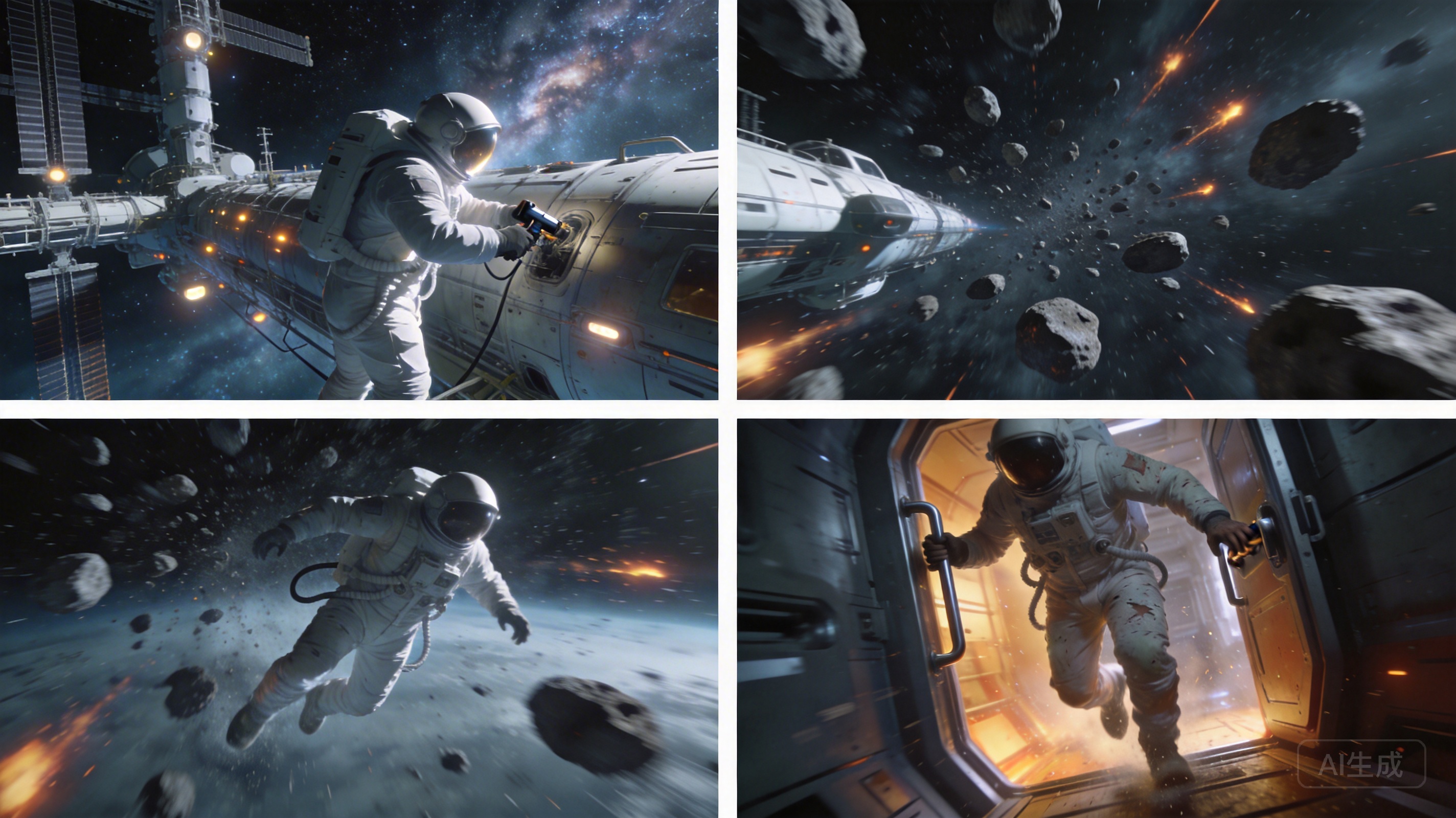 | \
|场景1为宇航员在空间站维修飞船,空间站外部精密机械结构,深邃星空 + 银河背景,宇航员身穿细节完整的白色宇航服,手持专业维修工具,专注检修飞船外壳,中全景构图,侧逆光勾勒轮廓,冷色调科幻光影,空间站灯光点缀,失重环境,金属质感细腻,画面静谧严谨。 | | \
|场景2为:突然遇到陨石带袭击,广角史诗镜头,大量大小不一的陨石高速袭来,陨石表面纹理清晰,带燃烧尾焰,动态模糊体现速度感,陨石带压迫感拉满,飞船与空间站在画面一侧,太空黑暗深邃,光影强烈对比,紧张灾难氛围,画面冲击力十足。 | | \
|场景3为:宇航员紧急躲避,近景动态抓拍,宇航员失重状态下极速侧身躲避,肢体动作张力拉满,伸手抓握固定扶手,背景陨石飞掠而过,轻微镜头晃动增强临场感,宇航服褶皱、管线细节清晰,急促紧张,冷冽光影,主体突出不杂乱。 | | \
|场景4为:受伤后惊险逃回飞船,中近景叙事镜头,宇航员宇航服带轻微破损划痕,略显狼狈却坚毅,踉跄冲向开启的飞船舱门,舱内暖光与太空冷光形成对比,背景陨石逐渐远去,惊险逃生氛围,细节真实,情绪饱满。 | |
**选项:Curl**
```Bash
curl https://ark.cn-beijing.volces.com/api/v3/images/generations \
-H "Content-Type: application/json" \
-H "Authorization: Bearer $ARK_API_KEY" \
-d '{
"model": "doubao-seedream-4-0-260415",
"prompt": "生成一组电影级科幻写实风的4张影视分镜:场景1为宇航员在空间站维修飞船,空间站外部精密机械结构,深邃星空 + 银河背景,宇航员身穿细节完整的白色宇航服,手持专业维修工具,专注检修飞船外壳,中全景构图,侧逆光勾勒轮廓,冷色调科幻光影,空间站灯光点缀,失重环境,金属质感细腻,画面静谧严谨。场景2为:突然遇到陨石带袭击,广角史诗镜头,大量大小不一的陨石高速袭来,陨石表面纹理清晰,带燃烧尾焰,动态模糊体现速度感,陨石带压迫感拉满,飞船与空间站在画面一侧,太空黑暗深邃,光影强烈对比,紧张灾难氛围,画面冲击力十足。场景3为:宇航员紧急躲避,近景动态抓拍,宇航员失重状态下极速侧身躲避,肢体动作张力拉满,伸手抓握固定扶手,背景陨石飞掠而过,轻微镜头晃动增强临场感,宇航服褶皱、管线细节清晰,急促紧张,冷冽光影,主体突出不杂乱。场景4为:受伤后惊险逃回飞船,中近景叙事镜头,宇航员宇航服带轻微破损划痕,略显狼狈却坚毅,踉跄冲向开启的飞船舱门,舱内暖光与太空冷光形成对比,背景陨石逐渐远去,惊险逃生氛围,细节真实,情绪饱满。",
"size": "2K",
"sequential_image_generation": "auto",
"sequential_image_generation_options": {
"max_images": 4
},
"stream": false,
"response_format": "url",
"watermark": true
}'
```
**选项:Python**
```Python
import os
# Install SDK: python -m pip install --upgrade arkruntime
from arkruntime import Ark
from arkruntime.types.images import SequentialImageGenerationOptionsParam
client = Ark(
# The base URL for model invocation .
base_url="https://ark.cn-beijing.volces.com/api/v3",
# Get API Key: https://ark.volcengine.com/region:cn-beijing/apikey
api_key=os.getenv('ARK_API_KEY'),
)
imagesResponse = client.images.generate(
# Replace with Model ID
model="doubao-seedream-4-0-260415",
prompt="生成一组电影级科幻写实风的4张影视分镜:场景1为宇航员在空间站维修飞船,空间站外部精密机械结构,深邃星空 + 银河背景,宇航员身穿细节完整的白色宇航服,手持专业维修工具,专注检修飞船外壳,中全景构图,侧逆光勾勒轮廓,冷色调科幻光影,空间站灯光点缀,失重环境,金属质感细腻,画面静谧严谨。场景2为:突然遇到陨石带袭击,广角史诗镜头,大量大小不一的陨石高速袭来,陨石表面纹理清晰,带燃烧尾焰,动态模糊体现速度感,陨石带压迫感拉满,飞船与空间站在画面一侧,太空黑暗深邃,光影强烈对比,紧张灾难氛围,画面冲击力十足。场景3为:宇航员紧急躲避,近景动态抓拍,宇航员失重状态下极速侧身躲避,肢体动作张力拉满,伸手抓握固定扶手,背景陨石飞掠而过,轻微镜头晃动增强临场感,宇航服褶皱、管线细节清晰,急促紧张,冷冽光影,主体突出不杂乱。场景4为:受伤后惊险逃回飞船,中近景叙事镜头,宇航员宇航服带轻微破损划痕,略显狼狈却坚毅,踉跄冲向开启的飞船舱门,舱内暖光与太空冷光形成对比,背景陨石逐渐远去,惊险逃生氛围,细节真实,情绪饱满。",
size="2K",
sequential_image_generation="auto",
sequential_image_generation_options=SequentialImageGenerationOptionsParam(max_images=4),
response_format="url",
watermark=True
)
# Iterate through all image data
for image in imagesResponse.data:
# Output the current image's URL and size
print(f"URL: {image.url}, Size: {image.size}")
```
**选项:Java**
```Java
package com.ark.sample;
import com.volcengine.ark.runtime.models.images.*;
import com.volcengine.ark.runtime.service.ArkService;
import okhttp3.ConnectionPool;
import okhttp3.Dispatcher;
import java.util.Arrays;
import java.util.List;
import java.util.concurrent.TimeUnit;
public class ImageGenerationsExample {
public static void main(String[] args) {
String apiKey = System.getenv("ARK_API_KEY");
ConnectionPool connectionPool = new ConnectionPool(5, 1, TimeUnit.SECONDS);
Dispatcher dispatcher = new Dispatcher();
ArkService service = ArkService.builder()
.baseUrl("https://ark.cn-beijing.volces.com/api/v3")
// The base URL for model invocation
.dispatcher(dispatcher)
.connectionPool(connectionPool)
.apiKey(apiKey)
.build();
SequentialImageGenerationOptions sequentialImageGenerationOptions = new SequentialImageGenerationOptions();
sequentialImageGenerationOptions.setMaxImages(4);
CreateImageGenerationRequest generateRequest = CreateImageGenerationRequest.builder()
.model("doubao-seedream-4-0-260415") // Replace with Model ID
.prompt("生成一组电影级科幻写实风的4张影视分镜:场景1为宇航员在空间站维修飞船,空间站外部精密机械结构,深邃星空 + 银河背景,宇航员身穿细节完整的白色宇航服,手持专业维修工具,专注检修飞船外壳,中全景构图,侧逆光勾勒轮廓,冷色调科幻光影,空间站灯光点缀,失重环境,金属质感细腻,画面静谧严谨。场景2为:突然遇到陨石带袭击,广角史诗镜头,大量大小不一的陨石高速袭来,陨石表面纹理清晰,带燃烧尾焰,动态模糊体现速度感,陨石带压迫感拉满,飞船与空间站在画面一侧,太空黑暗深邃,光影强烈对比,紧张灾难氛围,画面冲击力十足。场景3为:宇航员紧急躲避,近景动态抓拍,宇航员失重状态下极速侧身躲避,肢体动作张力拉满,伸手抓握固定扶手,背景陨石飞掠而过,轻微镜头晃动增强临场感,宇航服褶皱、管线细节清晰,急促紧张,冷冽光影,主体突出不杂乱。场景4为:受伤后惊险逃回飞船,中近景叙事镜头,宇航员宇航服带轻微破损划痕,略显狼狈却坚毅,踉跄冲向开启的飞船舱门,舱内暖光与太空冷光形成对比,背景陨石逐渐远去,惊险逃生氛围,细节真实,情绪饱满。")
.size("2K")
.sequentialImageGeneration(SequentialImageGenerationMode.AUTO)
.sequentialImageGenerationOptions(sequentialImageGenerationOptions)
.responseFormat(ResponseFormat.URL)
.stream(false)
.watermark(true)
.build();
ImageGenerationResponse imagesResponse = service.generateImages(generateRequest);
// Iterate through all image data
if (imagesResponse != null && imagesResponse.getData() != null) {
for (int i = 0; i < imagesResponse.getData().size(); i++) {
// Retrieve image information
String url = imagesResponse.getData().get(i).getUrl();
String size = imagesResponse.getData().get(i).getSize();
System.out.printf("Image %d:%n", i + 1);
System.out.printf(" URL: %s%n", url);
System.out.printf(" Size: %s%n", size);
System.out.println();
}
service.shutdownExecutor();
}
}
}
```
**选项:Go**
```Go
package main
import (
"context"
"fmt"
"os"
"github.com/volcengine/ark-runtime-go/arkruntime"
model "github.com/volcengine/ark-runtime-go/arkruntime/model/images"
)
func main() {
client := arkruntime.NewClientWithApiKey(
os.Getenv("ARK_API_KEY"),
// The base URL for model invocation
arkruntime.WithBaseUrl("https://ark.cn-beijing.volces.com/api/v3"),
)
ctx := context.Background()
var sequentialImageGeneration model.SequentialImageGenerationMode = "auto"
maxImages := 4
generateReq := &model.CreateImageGenerationRequest{
Model: "doubao-seedream-4-0-260415",
Prompt: model.NewOptString("生成一组电影级科幻写实风的4张影视分镜:场景1为宇航员在空间站维修飞船,空间站外部精密机械结构,深邃星空 + 银河背景,宇航员身穿细节完整的白色宇航服,手持专业维修工具,专注检修飞船外壳,中全景构图,侧逆光勾勒轮廓,冷色调科幻光影,空间站灯光点缀,失重环境,金属质感细腻,画面静谧严谨。场景2为:突然遇到陨石带袭击,广角史诗镜头,大量大小不一的陨石高速袭来,陨石表面纹理清晰,带燃烧尾焰,动态模糊体现速度感,陨石带压迫感拉满,飞船与空间站在画面一侧,太空黑暗深邃,光影强烈对比,紧张灾难氛围,画面冲击力十足。场景3为:宇航员紧急躲避,近景动态抓拍,宇航员失重状态下极速侧身躲避,肢体动作张力拉满,伸手抓握固定扶手,背景陨石飞掠而过,轻微镜头晃动增强临场感,宇航服褶皱、管线细节清晰,急促紧张,冷冽光影,主体突出不杂乱。场景4为:受伤后惊险逃回飞船,中近景叙事镜头,宇航员宇航服带轻微破损划痕,略显狼狈却坚毅,踉跄冲向开启的飞船舱门,舱内暖光与太空冷光形成对比,背景陨石逐渐远去,惊险逃生氛围,细节真实,情绪饱满。"),
Size: model.NewOptString("2K"),
ResponseFormat: model.NewOptResponseFormat(model.ResponseFormatURL),
Watermark: model.NewOptBool(true),
SequentialImageGeneration: model.NewOptSequentialImageGenerationMode(sequentialImageGeneration),
SequentialImageGenerationOptions: model.NewOptSequentialImageGenerationOptions(model.SequentialImageGenerationOptions{
MaxImages: model.NewOptInt32(int32(maxImages)),
}),
}
resp, err := client.GenerateImages(ctx, generateReq)
if err != nil {
fmt.Printf("call GenerateImages error: %v\n", err)
return
}
if resp.Error.IsSet() {
fmt.Printf("API returned error: %s - %s\n", resp.Error.Value.Code, resp.Error.Value.Message)
return
}
// Output the generated image information
fmt.Printf("Generated %d images:\n", len(resp.Data))
for i, image := range resp.Data {
var url string
if image.URL.IsSet() {
url = image.URL.Or("")
} else {
url = "N/A"
}
fmt.Printf("Image %d: Size: %s, URL: %s\n", i+1, image.Size.Or(""), url)
}
}
```
**选项:OpenAI**
```Python
import os
from openai import OpenAI
client = OpenAI(
# The base URL for model invocation .
base_url="https://ark.cn-beijing.volces.com/api/v3",
# Get API Key: https://ark.volcengine.com/region:cn-beijing/apikey
api_key=os.getenv('ARK_API_KEY'),
)
imagesResponse = client.images.generate(
model="doubao-seedream-4-0-260415",
prompt="生成一组电影级科幻写实风的4张影视分镜:场景1为宇航员在空间站维修飞船,空间站外部精密机械结构,深邃星空 + 银河背景,宇航员身穿细节完整的白色宇航服,手持专业维修工具,专注检修飞船外壳,中全景构图,侧逆光勾勒轮廓,冷色调科幻光影,空间站灯光点缀,失重环境,金属质感细腻,画面静谧严谨。场景2为:突然遇到陨石带袭击,广角史诗镜头,大量大小不一的陨石高速袭来,陨石表面纹理清晰,带燃烧尾焰,动态模糊体现速度感,陨石带压迫感拉满,飞船与空间站在画面一侧,太空黑暗深邃,光影强烈对比,紧张灾难氛围,画面冲击力十足。场景3为:宇航员紧急躲避,近景动态抓拍,宇航员失重状态下极速侧身躲避,肢体动作张力拉满,伸手抓握固定扶手,背景陨石飞掠而过,轻微镜头晃动增强临场感,宇航服褶皱、管线细节清晰,急促紧张,冷冽光影,主体突出不杂乱。场景4为:受伤后惊险逃回飞船,中近景叙事镜头,宇航员宇航服带轻微破损划痕,略显狼狈却坚毅,踉跄冲向开启的飞船舱门,舱内暖光与太空冷光形成对比,背景陨石逐渐远去,惊险逃生氛围,细节真实,情绪饱满。",
size="2K",
response_format="url",
extra_body={
"watermark": True,
"sequential_image_generation": "auto",
"sequential_image_generation_options": {
"max_images": 4
},
},
)
# Iterate through all image data
for image in imagesResponse.data:
# Output the current image's URL and size
print(f"URL: {image.url}, Size: {image.size}")
```
### 单张图生组图
|提示词 |输入图 |输出(实际会输出4张图片) |
|---|---|---|
|参考这个 LOGO,做一套户外运动品牌视觉设计,品牌名称为“GREEN”,包括包装袋、帽子、卡片、挂绳等。绿色视觉主色调,趣味、简约现代风格。 | |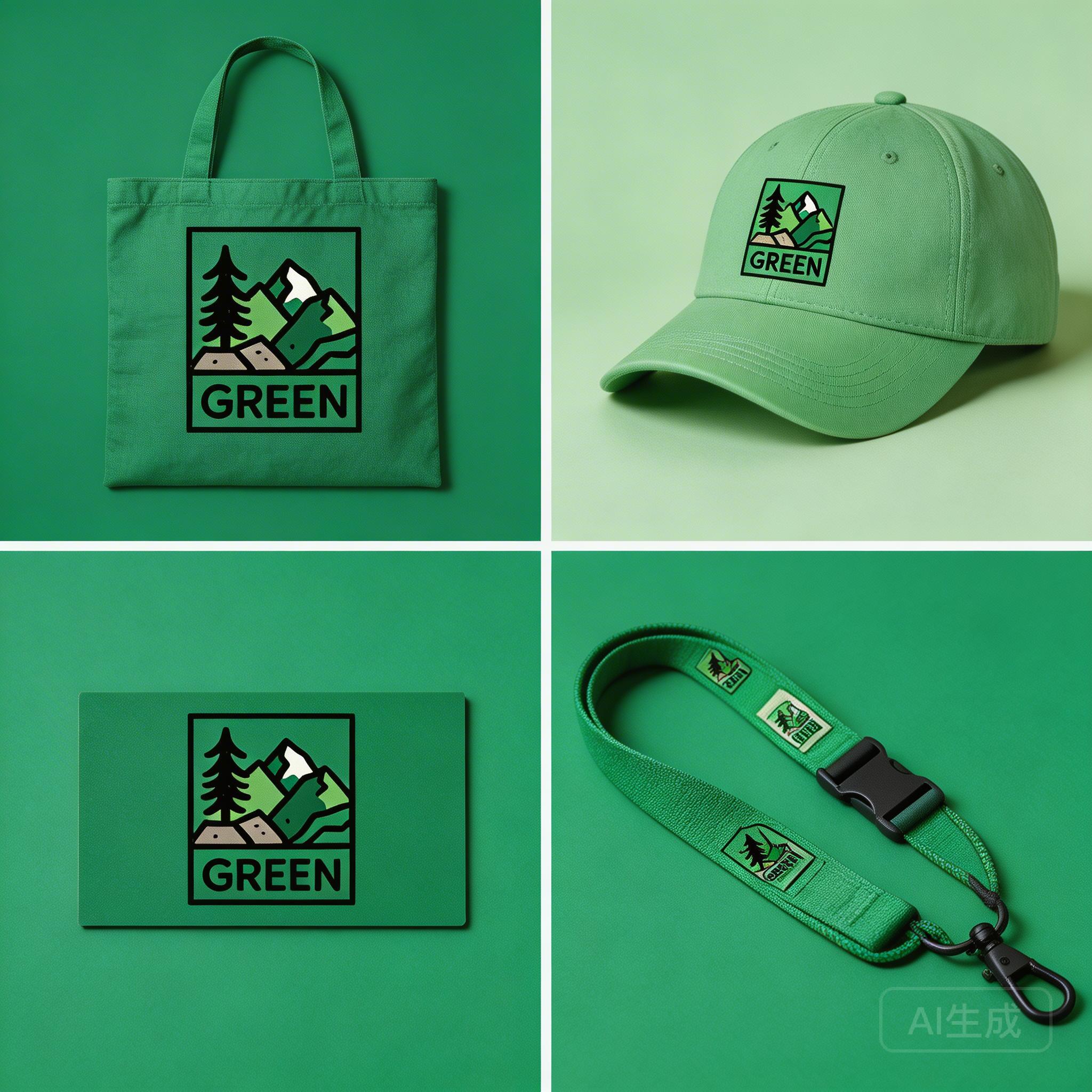 |
**选项:Curl**
```Bash
curl https://ark.cn-beijing.volces.com/api/v3/images/generations \
-H "Content-Type: application/json" \
-H "Authorization: Bearer $ARK_API_KEY" \
-d '{
"model": "doubao-seedream-4-0-260415",
"prompt": "参考这个LOGO,做一套户外运动品牌视觉设计,品牌名称为“GREEN”,包括包装袋、帽子、卡片、挂绳等。绿色视觉主色调,趣味、简约现代风格",
"image": "https://arkdocs.tos-cn-beijing.volces.com/images/image-generation/seedream4_imageToimages.png",
"size": "2K",
"sequential_image_generation": "auto",
"sequential_image_generation_options": {
"max_images": 4
},
"stream": false,
"response_format": "url",
"watermark": true
}'
```
**选项:Python**
```Python
import os
# Install SDK: python -m pip install --upgrade arkruntime
from arkruntime import Ark
from arkruntime.types.images import SequentialImageGenerationOptionsParam
client = Ark(
# The base URL for model invocation .
base_url="https://ark.cn-beijing.volces.com/api/v3",
# Get API Key: https://ark.volcengine.com/region:cn-beijing/apikey
api_key=os.getenv('ARK_API_KEY'),
)
imagesResponse = client.images.generate(
# Replace with Model ID .
model="doubao-seedream-4-0-260415",
prompt="参考这个LOGO,做一套户外运动品牌视觉设计,品牌名称为“GREEN”,包括包装袋、帽子、卡片、挂绳等。绿色视觉主色调,趣味、简约现代风格",
image="https://arkdocs.tos-cn-beijing.volces.com/images/image-generation/seedream4_imageToimages.png",
size="2K",
sequential_image_generation="auto",
sequential_image_generation_options=SequentialImageGenerationOptionsParam(max_images=4),
response_format="url",
watermark=True
)
# Iterate through all image data
for image in imagesResponse.data:
# Output the current image's URL and size
print(f"URL: {image.url}, Size: {image.size}")
```
**选项:Java**
```Java
package com.ark.sample;
import com.volcengine.ark.runtime.models.images.*;
import com.volcengine.ark.runtime.service.ArkService;
import okhttp3.ConnectionPool;
import okhttp3.Dispatcher;
import java.util.Arrays;
import java.util.List;
import java.util.concurrent.TimeUnit;
public class ImageGenerationsExample {
public static void main(String[] args) {
String apiKey = System.getenv("ARK_API_KEY");
ConnectionPool connectionPool = new ConnectionPool(5, 1, TimeUnit.SECONDS);
Dispatcher dispatcher = new Dispatcher();
ArkService service = ArkService.builder()
.baseUrl("https://ark.cn-beijing.volces.com/api/v3")
// The base URL for model invocation
.dispatcher(dispatcher)
.connectionPool(connectionPool)
.apiKey(apiKey)
.build();
SequentialImageGenerationOptions sequentialImageGenerationOptions = new SequentialImageGenerationOptions();
sequentialImageGenerationOptions.setMaxImages(4);
// CreateImageGenerationRequestImage requires ark-runtime 0.6.0 or later.
CreateImageGenerationRequest generateRequest = CreateImageGenerationRequest.builder()
.model("doubao-seedream-4-0-260415") // Replace with Model ID
.prompt("参考这个LOGO,做一套户外运动品牌视觉设计,品牌名称为“GREEN”,包括包装袋、帽子、卡片、挂绳等。绿色视觉主色调,趣味、简约现代风格")
.image(CreateImageGenerationRequestImage.ofString("https://arkdocs.tos-cn-beijing.volces.com/images/image-generation/seedream4_imageToimages.png"))
.size("2K")
.sequentialImageGeneration(SequentialImageGenerationMode.AUTO)
.sequentialImageGenerationOptions(sequentialImageGenerationOptions)
.responseFormat(ResponseFormat.URL)
.stream(false)
.watermark(true)
.build();
ImageGenerationResponse imagesResponse = service.generateImages(generateRequest);
// Iterate through all image data
if (imagesResponse != null && imagesResponse.getData() != null) {
for (int i = 0; i < imagesResponse.getData().size(); i++) {
// Retrieve image information
String url = imagesResponse.getData().get(i).getUrl();
String size = imagesResponse.getData().get(i).getSize();
System.out.printf("Image %d:%n", i + 1);
System.out.printf(" URL: %s%n", url);
System.out.printf(" Size: %s%n", size);
System.out.println();
}
service.shutdownExecutor();
}
}
}
```
**选项:Go**
```Go
package main
import (
"context"
"fmt"
"os"
"github.com/volcengine/ark-runtime-go/arkruntime"
model "github.com/volcengine/ark-runtime-go/arkruntime/model/images"
)
func main() {
client := arkruntime.NewClientWithApiKey(
os.Getenv("ARK_API_KEY"),
// The base URL for model invocation
arkruntime.WithBaseUrl("https://ark.cn-beijing.volces.com/api/v3"),
)
ctx := context.Background()
var sequentialImageGeneration model.SequentialImageGenerationMode = "auto"
maxImages := 4
generateReq := &model.CreateImageGenerationRequest{
Model: "doubao-seedream-4-0-260415",
Prompt: model.NewOptString("参考这个LOGO,做一套户外运动品牌视觉设计,品牌名称为“GREEN”,包括包装袋、帽子、卡片、挂绳等。绿色视觉主色调,趣味、简约现代风格"),
Image: model.NewOptCreateImageGenerationRequestImage(model.NewStringArrayCreateImageGenerationRequestImage([]string{"https://arkdocs.tos-cn-beijing.volces.com/images/image-generation/seedream4_imageToimages.png"})),
Size: model.NewOptString("2K"),
ResponseFormat: model.NewOptResponseFormat(model.ResponseFormatURL),
Watermark: model.NewOptBool(true),
SequentialImageGeneration: model.NewOptSequentialImageGenerationMode(sequentialImageGeneration),
SequentialImageGenerationOptions: model.NewOptSequentialImageGenerationOptions(model.SequentialImageGenerationOptions{
MaxImages: model.NewOptInt32(int32(maxImages)),
}),
}
resp, err := client.GenerateImages(ctx, generateReq)
if err != nil {
fmt.Printf("call GenerateImages error: %v\n", err)
return
}
if resp.Error.IsSet() {
fmt.Printf("API returned error: %s - %s\n", resp.Error.Value.Code, resp.Error.Value.Message)
return
}
// Output the generated image information
fmt.Printf("Generated %d images:\n", len(resp.Data))
for i, image := range resp.Data {
var url string
if image.URL.IsSet() {
url = image.URL.Or("")
} else {
url = "N/A"
}
fmt.Printf("Image %d: Size: %s, URL: %s\n", i+1, image.Size.Or(""), url)
}
}
```
**选项:OpenAI**
```Python
import os
from openai import OpenAI
client = OpenAI(
# The base URL for model invocation
base_url="https://ark.cn-beijing.volces.com/api/v3",
# Get API Key: https://ark.volcengine.com/region:cn-beijing/apikey
api_key=os.getenv('ARK_API_KEY'),
)
imagesResponse = client.images.generate(
model="doubao-seedream-4-0-260415",
prompt="参考这个LOGO,做一套户外运动品牌视觉设计,品牌名称为“GREEN”,包括包装袋、帽子、卡片、挂绳等。绿色视觉主色调,趣味、简约现代风格",
size="2K",
response_format="url",
extra_body={
"image": "https://arkdocs.tos-cn-beijing.volces.com/images/image-generation/seedream4_imageToimages.png",
"watermark": True,
"sequential_image_generation": "auto",
"sequential_image_generation_options": {
"max_images": 4
},
}
)
# Iterate through all image data
for image in imagesResponse.data:
# Output the current image's URL and size
print(f"URL: {image.url}, Size: {image.size}")
```
### 多参考图生组图
|提示词 |输入图1 |输入图2 |输出(实际会输出3张图片) |
|---|---|---|---|
|生成3张女孩和奶牛玩偶在游乐园开心地坐过山车的图片,涵盖早晨、中午、晚上 |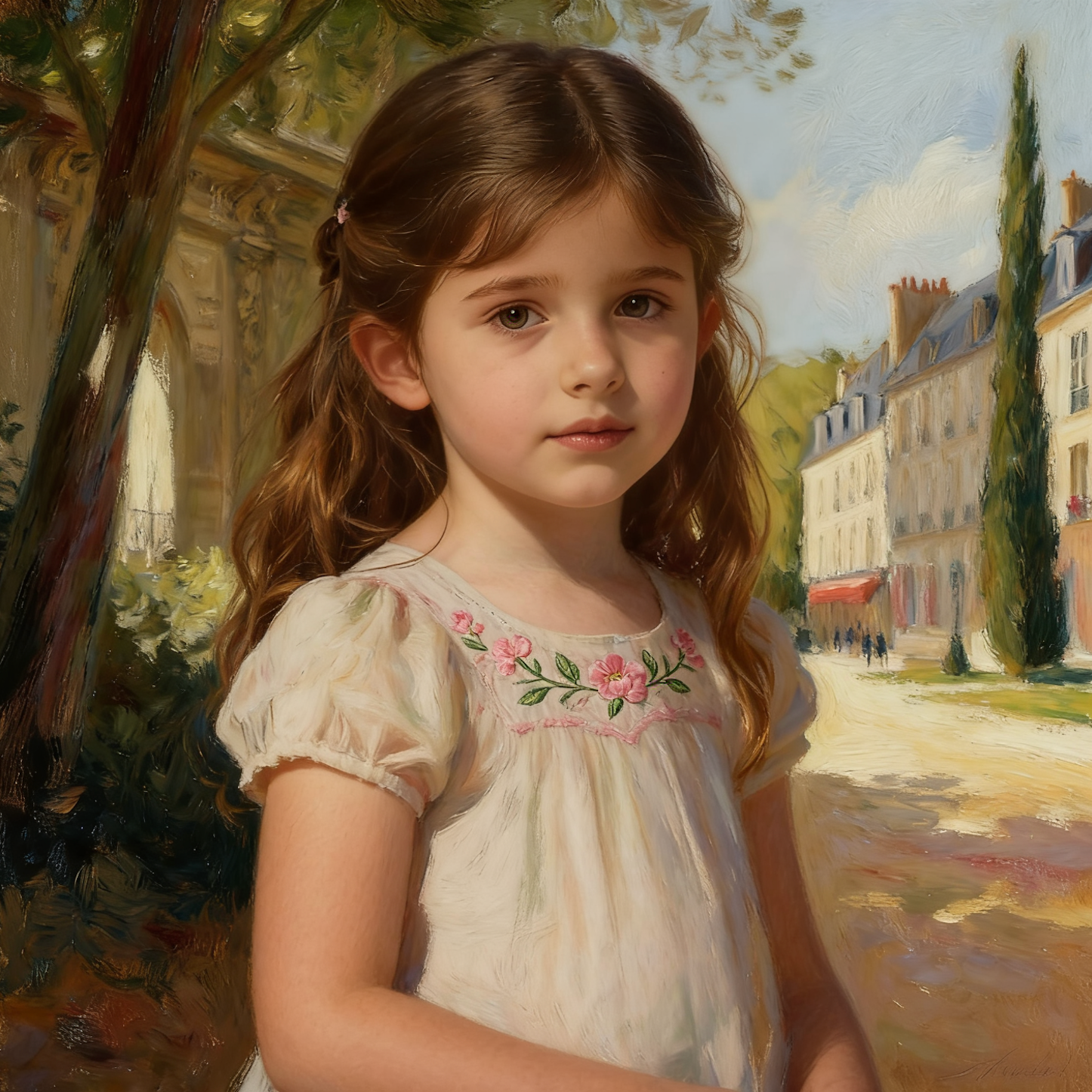 |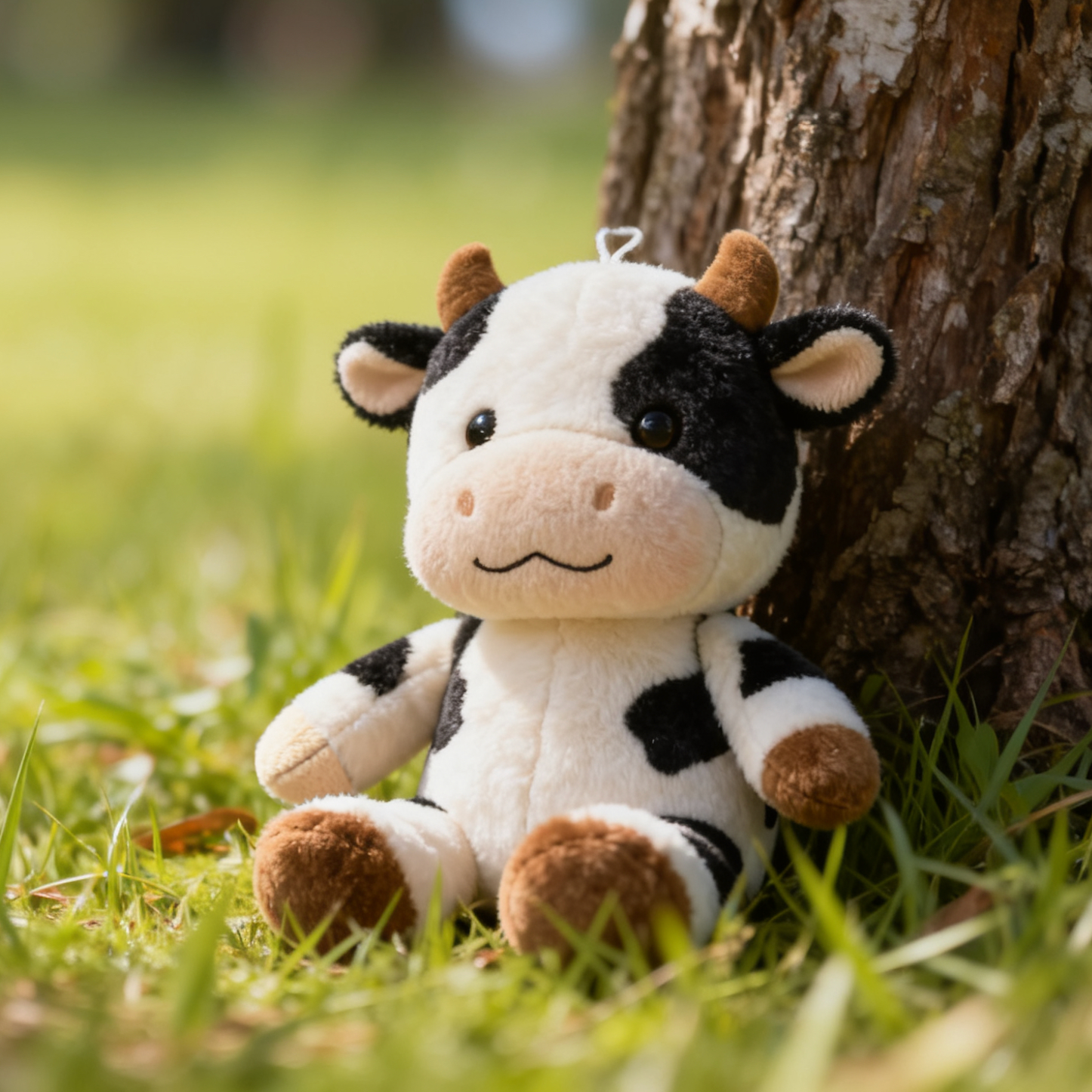 |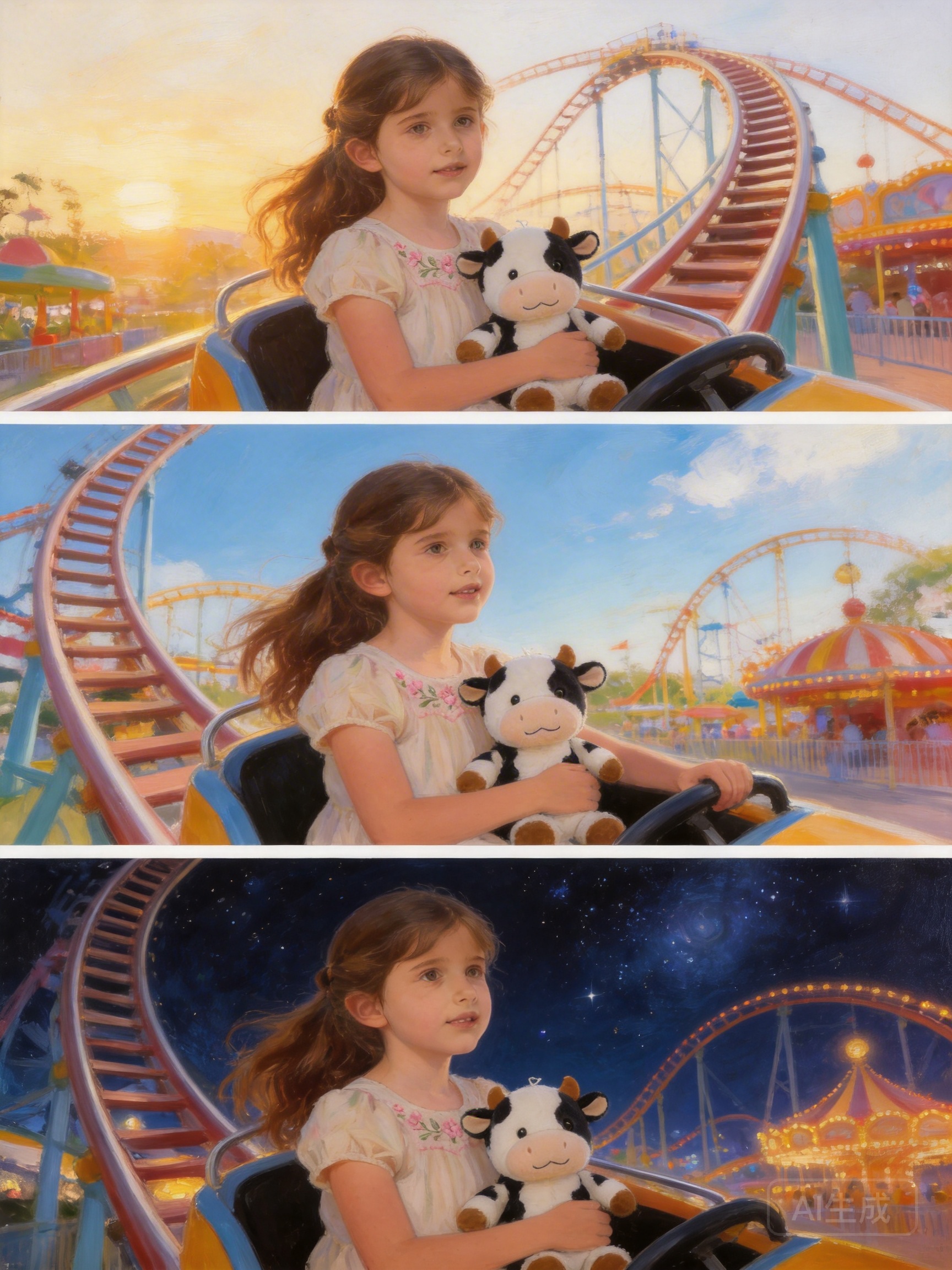 |
**选项:Curl**
```Bash
curl https://ark.cn-beijing.volces.com/api/v3/images/generations \
-H "Content-Type: application/json" \
-H "Authorization: Bearer $ARK_API_KEY" \
-d '{
"model": "doubao-seedream-4-0-260415",
"prompt": "生成3张女孩和奶牛玩偶在游乐园开心地坐过山车的图片,涵盖早晨、中午、晚上",
"image": ["https://arkdocs.tos-cn-beijing.volces.com/images/image-generation/seedream4_imagesToimages_1.png", "https://arkdocs.tos-cn-beijing.volces.com/images/image-generation/seedream4_imagesToimages_2.png"],
"sequential_image_generation": "auto",
"sequential_image_generation_options": {
"max_images": 3
},
"size": "2K",
"watermark": true
}'
```
**选项:Python**
```Python
import os
# Install SDK: python -m pip install --upgrade arkruntime
from arkruntime import Ark
from arkruntime.types.images import SequentialImageGenerationOptionsParam
client = Ark(
# The base URL for model invocation
base_url="https://ark.cn-beijing.volces.com/api/v3",
# Get API Key: https://ark.volcengine.com/region:cn-beijing/apikey
api_key=os.getenv('ARK_API_KEY'),
)
imagesResponse = client.images.generate(
# Replace with Model ID
model="doubao-seedream-4-0-260415",
prompt="生成3张女孩和奶牛玩偶在游乐园开心地坐过山车的图片,涵盖早晨、中午、晚上",
image=["https://arkdocs.tos-cn-beijing.volces.com/images/image-generation/seedream4_imagesToimages_1.png", "https://arkdocs.tos-cn-beijing.volces.com/images/image-generation/seedream4_imagesToimages_2.png"],
size="2K",
sequential_image_generation="auto",
sequential_image_generation_options=SequentialImageGenerationOptionsParam(max_images=3),
response_format="url",
watermark=True
)
# Iterate through all image data
for image in imagesResponse.data:
# Output the current image's URL and size
print(f"URL: {image.url}, Size: {image.size}")
```
**选项:Java**
```Java
package com.ark.sample;
import com.volcengine.ark.runtime.models.images.*;
import com.volcengine.ark.runtime.service.ArkService;
import okhttp3.ConnectionPool;
import okhttp3.Dispatcher;
import java.util.Arrays;
import java.util.List;
import java.util.concurrent.TimeUnit;
public class ImageGenerationsExample {
public static void main(String[] args) {
String apiKey = System.getenv("ARK_API_KEY");
ConnectionPool connectionPool = new ConnectionPool(5, 1, TimeUnit.SECONDS);
Dispatcher dispatcher = new Dispatcher();
ArkService service = ArkService.builder()
.baseUrl("https://ark.cn-beijing.volces.com/api/v3")
// The base URL for model invocation
.dispatcher(dispatcher)
.connectionPool(connectionPool)
.apiKey(apiKey)
.build();
SequentialImageGenerationOptions sequentialImageGenerationOptions = new SequentialImageGenerationOptions();
sequentialImageGenerationOptions.setMaxImages(3);
// CreateImageGenerationRequestImage requires ark-runtime 0.6.0 or later.
CreateImageGenerationRequest generateRequest = CreateImageGenerationRequest.builder()
.model("doubao-seedream-4-0-260415") // Replace with Model ID
.prompt("生成3张女孩和奶牛玩偶在游乐园开心地坐过山车的图片,涵盖早晨、中午、晚上")
.image(CreateImageGenerationRequestImage.ofList(Arrays.asList(
"https://arkdocs.tos-cn-beijing.volces.com/images/image-generation/seedream4_imagesToimages_1.png",
"https://arkdocs.tos-cn-beijing.volces.com/images/image-generation/seedream4_imagesToimages_2.png"
)))
.size("2K")
.sequentialImageGeneration(SequentialImageGenerationMode.AUTO)
.sequentialImageGenerationOptions(sequentialImageGenerationOptions)
.responseFormat(ResponseFormat.URL)
.stream(false)
.watermark(true)
.build();
ImageGenerationResponse imagesResponse = service.generateImages(generateRequest);
// Iterate through all image data
if (imagesResponse != null && imagesResponse.getData() != null) {
for (int i = 0; i < imagesResponse.getData().size(); i++) {
// Retrieve image information
String url = imagesResponse.getData().get(i).getUrl();
String size = imagesResponse.getData().get(i).getSize();
System.out.printf("Image %d:%n", i + 1);
System.out.printf(" URL: %s%n", url);
System.out.printf(" Size: %s%n", size);
System.out.println();
}
service.shutdownExecutor();
}
}
}
```
**选项:Go**
```Go
package main
import (
"context"
"fmt"
"os"
"github.com/volcengine/ark-runtime-go/arkruntime"
model "github.com/volcengine/ark-runtime-go/arkruntime/model/images"
)
func main() {
client := arkruntime.NewClientWithApiKey(
os.Getenv("ARK_API_KEY"),
// The base URL for model invocation
arkruntime.WithBaseUrl("https://ark.cn-beijing.volces.com/api/v3"),
)
ctx := context.Background()
var sequentialImageGeneration model.SequentialImageGenerationMode = "auto"
maxImages := 3
generateReq := &model.CreateImageGenerationRequest{
Model: "doubao-seedream-4-0-260415",
Prompt: model.NewOptString("生成3张女孩和奶牛玩偶在游乐园开心地坐过山车的图片,涵盖早晨、中午、晚上"),
Image: model.NewOptCreateImageGenerationRequestImage(model.NewStringArrayCreateImageGenerationRequestImage([]string{
"https://arkdocs.tos-cn-beijing.volces.com/images/image-generation/seedream4_imagesToimages_1.png",
"https://arkdocs.tos-cn-beijing.volces.com/images/image-generation/seedream4_imagesToimages_2.png",
})),
Size: model.NewOptString("2K"),
ResponseFormat: model.NewOptResponseFormat(model.ResponseFormatURL),
Watermark: model.NewOptBool(true),
SequentialImageGeneration: model.NewOptSequentialImageGenerationMode(sequentialImageGeneration),
SequentialImageGenerationOptions: model.NewOptSequentialImageGenerationOptions(model.SequentialImageGenerationOptions{
MaxImages: model.NewOptInt32(int32(maxImages)),
}),
}
resp, err := client.GenerateImages(ctx, generateReq)
if err != nil {
fmt.Printf("call GenerateImages error: %v\n", err)
return
}
if resp.Error.IsSet() {
fmt.Printf("API returned error: %s - %s\n", resp.Error.Value.Code, resp.Error.Value.Message)
return
}
// Output the generated image information
fmt.Printf("Generated %d images:\n", len(resp.Data))
for i, image := range resp.Data {
var url string
if image.URL.IsSet() {
url = image.URL.Or("")
} else {
url = "N/A"
}
fmt.Printf("Image %d: Size: %s, URL: %s\n", i+1, image.Size.Or(""), url)
}
}
```
**选项:OpenAI**
```Python
import os
from openai import OpenAI
client = OpenAI(
# The base URL for model invocation
base_url="https://ark.cn-beijing.volces.com/api/v3",
# Get API Key: https://ark.volcengine.com/region:cn-beijing/apikey
api_key=os.getenv('ARK_API_KEY'),
)
imagesResponse = client.images.generate(
model="doubao-seedream-4-0-260415",
prompt="生成3张女孩和奶牛玩偶在游乐园开心地坐过山车的图片,涵盖早晨、中午、晚上",
size="2K",
response_format="url",
extra_body={
"image": ["https://arkdocs.tos-cn-beijing.volces.com/images/image-generation/seedream4_imagesToimages_1.png", "https://arkdocs.tos-cn-beijing.volces.com/images/image-generation/seedream4_imagesToimages_2.png"],
"watermark": True,
"sequential_image_generation": "auto",
"sequential_image_generation_options": {
"max_images": 3
},
}
)
# Iterate through all image data
for image in imagesResponse.data:
# Output the current image's URL and size
print(f"URL: {image.url}, Size: {image.size}")
```
## **提示词建议**
* 建议用**简洁连贯**的自然语言写明 **主体 + 行为 + 环境**,若对画面美学有要求,可用自然语言或短语补充 **风格**、**色彩**、**光影**、**构图** 等美学元素。详情可参见 [Seedream 4.0-5.0 提示词指南](/docs/seedream-4-0-5-0-prompt-guide)。
* 文本提示词(prompt)建议不超过300个汉字或600个英文单词。字数过多信息容易分散,模型可能因此忽略细节,只关注重点,造成图片缺失部分元素。
# 进阶使用
## 流式输出
> 仅 Seedream 4.0 支持。
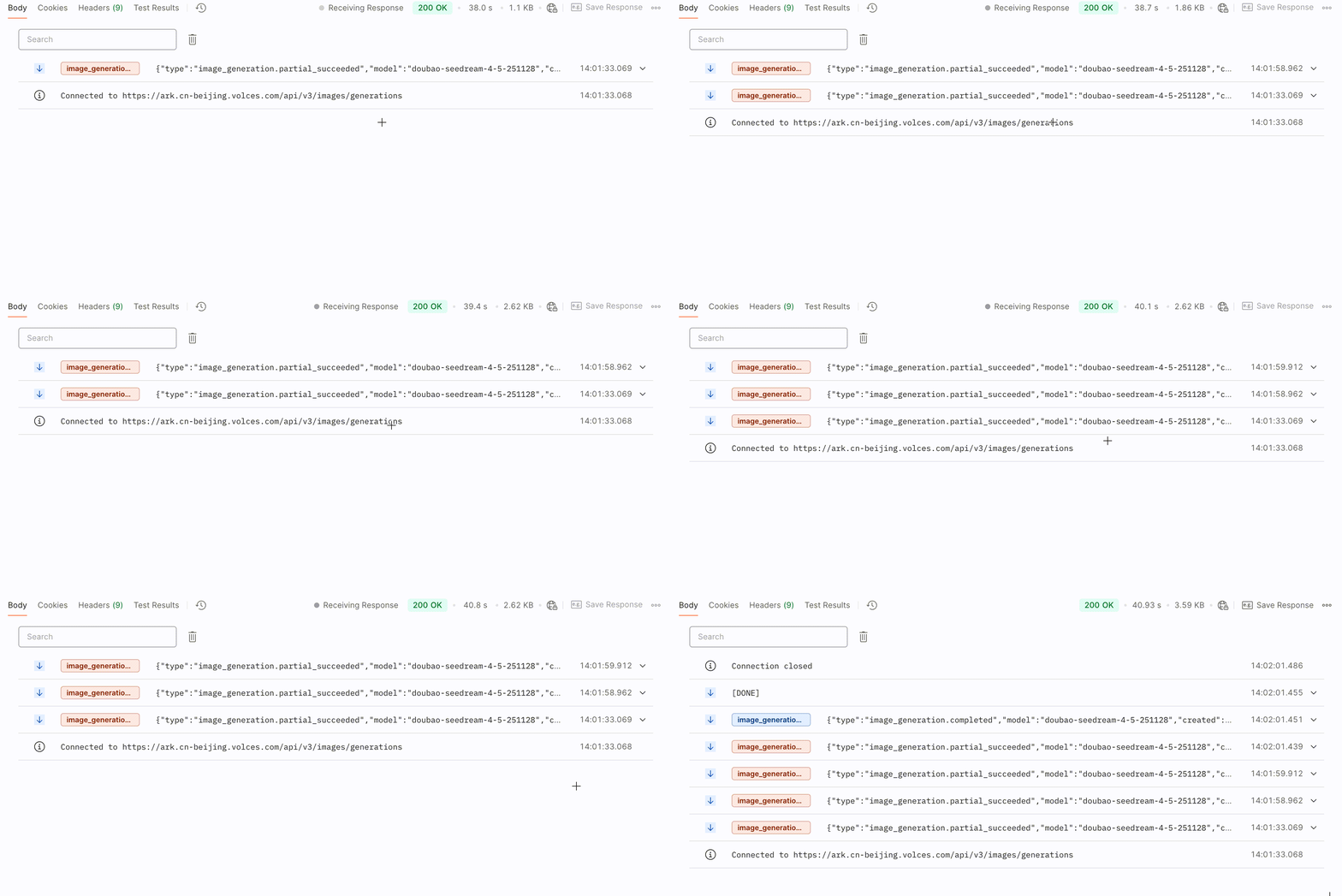
模型支持流式图像生成,当生成完任一图片后即返回结果,让您能更快浏览到生成的图像,改善等待体验。
通过配置 **stream** 参数为`true`,即可开启流式输出模式。
**选项:Curl**
```Bash
curl https://ark.cn-beijing.volces.com/api/v3/images/generations \
-H "Content-Type: application/json" \
-H "Authorization: Bearer $ARK_API_KEY" \
-d '{
"model": "doubao-seedream-4-0-260415",
"prompt": "参考图1,生成四图片,图中人物分别带着墨镜,骑着摩托,带着帽子,拿着棒棒糖",
"image": "https://arkdocs.tos-cn-beijing.volces.com/images/image-generation/seedream4_imageToimages_1.png",
"sequential_image_generation": "auto",
"sequential_image_generation_options": {
"max_images": 4
},
"size": "2K",
"stream": true,
"watermark": true
}'
```
**选项:Python**
```Python
import os
# Install SDK: python -m pip install --upgrade arkruntime
from arkruntime import Ark
from arkruntime.types.images import SequentialImageGenerationOptionsParam
client = Ark(
# The base URL for model invocation
base_url="https://ark.cn-beijing.volces.com/api/v3",
# Get API Key: https://ark.volcengine.com/region:cn-beijing/apikey
api_key=os.getenv('ARK_API_KEY'),
)
if __name__ == "__main__":
stream = client.images.generate(
# Replace with Model ID
model="doubao-seedream-4-0-260415",
prompt="参考图1,生成四图片,图中人物分别带着墨镜,骑着摩托,带着帽子,拿着棒棒糖",
image="https://arkdocs.tos-cn-beijing.volces.com/images/image-generation/seedream4_imageToimages_1.png",
size="2K",
sequential_image_generation="auto",
sequential_image_generation_options=SequentialImageGenerationOptionsParam(max_images=4),
response_format="url",
stream=True,
watermark=True
)
for event in stream:
if event is None:
continue
if event.type == "image_generation.partial_failed":
print(f"Stream generate images error: {event.error}")
if event.error is not None and event.error.code.equal("InternalServiceError"):
break
elif event.type == "image_generation.partial_succeeded":
if event.error is None and event.url:
print(f"recv.Size: {event.size}, recv.Url: {event.url}")
elif event.type == "image_generation.completed":
if event.error is None:
print("Final completed event:")
print("recv.Usage:", event.usage)
elif event.type == "image_generation.partial_image":
print(f"Partial image index={event.partial_image_index}, size={len(event.b64_json)}")
```
**选项:Java**
```Java
package com.ark.sample;
import com.volcengine.ark.runtime.models.images.*;
import com.volcengine.ark.runtime.service.ArkService;
import okhttp3.ConnectionPool;
import okhttp3.Dispatcher;
import java.util.Arrays;
import java.util.List;
import java.util.concurrent.TimeUnit;
public class ImageGenerationsExample {
public static void main(String[] args) {
String apiKey = System.getenv("ARK_API_KEY");
ConnectionPool connectionPool = new ConnectionPool(5, 1, TimeUnit.SECONDS);
Dispatcher dispatcher = new Dispatcher();
ArkService service = ArkService.builder()
.baseUrl("https://ark.cn-beijing.volces.com/api/v3")
// The base URL for model invocation
.dispatcher(dispatcher)
.connectionPool(connectionPool)
.apiKey(apiKey)
.build();
SequentialImageGenerationOptions sequentialImageGenerationOptions = new SequentialImageGenerationOptions();
sequentialImageGenerationOptions.setMaxImages(4);
// CreateImageGenerationRequestImage requires ark-runtime 0.6.0 or later.
CreateImageGenerationRequest generateRequest = CreateImageGenerationRequest.builder()
.model("doubao-seedream-4-0-260415") //Replace with Model ID .
.prompt("参考图1,生成四图片,图中人物分别带着墨镜,骑着摩托,带着帽子,拿着棒棒糖")
.image(CreateImageGenerationRequestImage.ofString("https://arkdocs.tos-cn-beijing.volces.com/images/image-generation/seedream4_imageToimages_1.png"))
.size("2K")
.sequentialImageGeneration(SequentialImageGenerationMode.AUTO)
.sequentialImageGenerationOptions(sequentialImageGenerationOptions)
.responseFormat(ResponseFormat.URL)
.stream(true)
.watermark(true)
.build();
service.streamGenerateImages(generateRequest)
.doOnError(Throwable::printStackTrace)
.blockingForEach(
choice -> {
if (choice == null) return;
if (ImageGenerationStreamEventType.IMAGE_GENERATION_PARTIAL_FAILED.equals(choice.getType())) {
if (choice.getError() != null) {
System.err.println("Stream generate images error: " + choice.getError());
if (choice.getError().getCode() != null && choice.getError().getCode().equals("InternalServiceError")) {
throw new RuntimeException("Server error, terminating stream.");
}
}
}
else if (ImageGenerationStreamEventType.IMAGE_GENERATION_PARTIAL_SUCCEEDED.equals(choice.getType())) {
if (choice.getError() == null && choice.getUrl() != null && !choice.getUrl().isEmpty()) {
System.out.printf("recv.Size: %s, recv.Url: %s%n", choice.getSize(), choice.getUrl());
}
}
else if (ImageGenerationStreamEventType.IMAGE_GENERATION_COMPLETED.equals(choice.getType())) {
if (choice.getError() == null && choice.getUsage() != null) {
System.out.println("recv.Usage: " + choice.getUsage().toString());
}
}
}
);
service.shutdownExecutor();
}
}
```
**选项:Go**
```Go
package main
import (
"context"
"fmt"
"io"
"os"
"strings"
"github.com/volcengine/ark-runtime-go/arkruntime"
model "github.com/volcengine/ark-runtime-go/arkruntime/model/images"
)
func main() {
client := arkruntime.NewClientWithApiKey(
os.Getenv("ARK_API_KEY"),
// The base URL for model invocation
arkruntime.WithBaseUrl("https://ark.cn-beijing.volces.com/api/v3"),
)
ctx := context.Background()
var sequentialImageGeneration model.SequentialImageGenerationMode = "auto"
maxImages := 4
generateReq := &model.CreateImageGenerationRequest{
Model: "doubao-seedream-4-0-260415",
Prompt: model.NewOptString("参考图1,生成四图片,图中人物分别带着墨镜,骑着摩托,带着帽子,拿着棒棒糖"),
Image: model.NewOptCreateImageGenerationRequestImage(model.NewStringArrayCreateImageGenerationRequestImage([]string{"https://arkdocs.tos-cn-beijing.volces.com/images/image-generation/seedream4_imageToimages_1.png"})),
Size: model.NewOptString("2K"),
ResponseFormat: model.NewOptResponseFormat(model.ResponseFormatURL),
Watermark: model.NewOptBool(true),
SequentialImageGeneration: model.NewOptSequentialImageGenerationMode(sequentialImageGeneration),
SequentialImageGenerationOptions: model.NewOptSequentialImageGenerationOptions(model.SequentialImageGenerationOptions{
MaxImages: model.NewOptInt32(int32(maxImages)),
}),
}
stream, err := client.GenerateImagesStreaming(ctx, generateReq)
if err != nil {
fmt.Printf("call GenerateImagesStreaming error: %v\n", err)
return
}
defer stream.Close()
for {
recv, err := stream.Recv()
if err == io.EOF {
break
}
if err != nil {
fmt.Printf("Stream generate images error: %v\n", err)
break
}
if recv.Type == model.ImageGenerationStreamEventTypeImageGenerationPartialFailed {
fmt.Printf("Stream generate images error: %v\n", recv.Error)
if strings.EqualFold(recv.Error.Value.Code, "InternalServiceError") {
break
}
}
if recv.Type == model.ImageGenerationStreamEventTypeImageGenerationPartialSucceeded {
if !recv.Error.IsSet() && recv.URL.IsSet() {
fmt.Printf("recv.Size: %s, recv.Url: %s\n", recv.Size.Or(""), recv.URL.Or(""))
}
}
if recv.Type == model.ImageGenerationStreamEventTypeImageGenerationCompleted {
if !recv.Error.IsSet() {
fmt.Printf("recv.Usage: %v\n", recv.Usage.Or(model.Usage{}))
}
}
}
}
```
**选项:OpenAI**
```Python
import os
from openai import OpenAI
client = OpenAI(
# The base URL for model invocation .
base_url="https://ark.cn-beijing.volces.com/api/v3",
# Get API Key: https://ark.volcengine.com/region:cn-beijing/apikey
api_key=os.getenv('ARK_API_KEY'),
)
if __name__ == "__main__":
stream = client.images.generate(
model="doubao-seedream-4-0-260415",
prompt="参考图1,生成四图片,图中人物分别带着墨镜,骑着摩托,带着帽子,拿着棒棒糖",
size="2K",
response_format="b64_json",
stream=True,
extra_body={
"image": "https://arkdocs.tos-cn-beijing.volces.com/images/image-generation/seedream4_imageToimages_1.png",
"watermark": True,
"sequential_image_generation": "auto",
"sequential_image_generation_options": {
"max_images": 4
},
},
)
for event in stream:
if event is None:
continue
elif event.type == "image_generation.partial_succeeded":
if event.b64_json is not None:
print(f"size={len(event.b64_json)}, base_64={event.b64_json}")
elif event.type == "image_generation.completed":
if event.usage is not None:
print("Final completed event:")
print("recv.Usage:", event.usage)
```
## 提升图片生成速度配置
通过设置 **optimize_prompt_options.mode** 参数,您可以在 `standard` 模式和 `fast` 模式之间进行选择,以根据自身对图片质量和生成速度的不同需求来优化提示词。
* 为平衡生成速度与图像质量,Seedream 5.0 pro、Seedream 4.0 支持将 **optimize_prompt_options.mode** 设置为 `fast` 模式以显著提升生成速度,但会在一定程度上牺牲图片质量。
* Seedream 5.5、Seedream 5.0 flash 仅支持 `standard` 模式。
**选项:Curl**
```Bash
curl https://ark.cn-beijing.volces.com/api/v3/images/generations \
-H "Content-Type: application/json" \
-H "Authorization: Bearer $ARK_API_KEY" \
-d '{
"model": "doubao-seedream-5-0-pro-260628",
"prompt": "生成一张庭院春景插画,画面中有盛开的花朵和绿树,光线柔和,色彩清新。",
"size": "2K",
"optimize_prompt_options": {
"mode": "fast"
},
"response_format": "url",
"watermark": true
}'
```
**选项:Python**
```Python
import os
# Install SDK: python -m pip install --upgrade arkruntime
from arkruntime import Ark
from arkruntime.types.images import OptimizePromptOptionsParam
client = Ark(
# The base URL for model invocation
base_url="https://ark.cn-beijing.volces.com/api/v3",
# Get API Key: https://ark.volcengine.com/region:cn-beijing/apikey
api_key=os.getenv('ARK_API_KEY'),
)
imagesResponse = client.images.generate(
# Replace with Model ID
model="doubao-seedream-5-0-pro-260628",
prompt="生成一张庭院春景插画,画面中有盛开的花朵和绿树,光线柔和,色彩清新。",
size="2K",
optimize_prompt_options=OptimizePromptOptionsParam(mode="fast"),
response_format="url",
watermark=True
)
# Iterate through all image data
for image in imagesResponse.data:
# Output the current image's URL and size
print(f"URL: {image.url}, Size: {image.size}")
```
**选项:Java**
```Java
package com.ark.sample;
import com.volcengine.ark.runtime.models.images.*;
import com.volcengine.ark.runtime.service.ArkService;
import okhttp3.ConnectionPool;
import okhttp3.Dispatcher;
import java.util.Arrays;
import java.util.List;
import java.util.concurrent.TimeUnit;
public class ImageGenerationsExample {
public static void main(String[] args) {
String apiKey = System.getenv("ARK_API_KEY");
ConnectionPool connectionPool = new ConnectionPool(5, 1, TimeUnit.SECONDS);
Dispatcher dispatcher = new Dispatcher();
ArkService service = ArkService.builder()
.baseUrl("https://ark.cn-beijing.volces.com/api/v3")
// The base URL for model invocation
.dispatcher(dispatcher)
.connectionPool(connectionPool)
.apiKey(apiKey)
.build();
OptimizePromptOptions optimizePromptOptions = new OptimizePromptOptions();
optimizePromptOptions.setMode(OptimizePromptMode.FAST);
CreateImageGenerationRequest generateRequest = CreateImageGenerationRequest.builder()
.model("doubao-seedream-5-0-pro-260628") //Replace with Model ID
.prompt("生成一张庭院春景插画,画面中有盛开的花朵和绿树,光线柔和,色彩清新。")
.size("2K")
.optimizePromptOptions(optimizePromptOptions)
.responseFormat(ResponseFormat.URL)
.watermark(true)
.build();
ImageGenerationResponse imagesResponse = service.generateImages(generateRequest);
// Iterate through all image data
if (imagesResponse != null && imagesResponse.getData() != null) {
for (int i = 0; i < imagesResponse.getData().size(); i++) {
// Retrieve image information
String url = imagesResponse.getData().get(i).getUrl();
String size = imagesResponse.getData().get(i).getSize();
System.out.printf("Image %d:%n", i + 1);
System.out.printf(" URL: %s%n", url);
System.out.printf(" Size: %s%n", size);
System.out.println();
}
service.shutdownExecutor();
}
}
}
```
**选项:Go**
```Go
package main
import (
"context"
"fmt"
"os"
"github.com/volcengine/ark-runtime-go/arkruntime"
model "github.com/volcengine/ark-runtime-go/arkruntime/model/images"
)
func main() {
client := arkruntime.NewClientWithApiKey(
os.Getenv("ARK_API_KEY"),
// The base URL for model invocation .
arkruntime.WithBaseUrl("https://ark.cn-beijing.volces.com/api/v3"),
)
ctx := context.Background()
mode := model.OptimizePromptModeFast
generateReq := &model.CreateImageGenerationRequest{
Model: "doubao-seedream-5-0-pro-260628",
Prompt: model.NewOptString("生成一张庭院春景插画,画面中有盛开的花朵和绿树,光线柔和,色彩清新。"),
Size: model.NewOptString("2K"),
ResponseFormat: model.NewOptResponseFormat(model.ResponseFormatURL),
Watermark: model.NewOptBool(true),
OptimizePromptOptions: model.NewOptOptimizePromptOptions(model.OptimizePromptOptions{
Mode: model.NewOptOptimizePromptMode(mode),
}),
}
resp, err := client.GenerateImages(ctx, generateReq)
if err != nil {
fmt.Printf("call GenerateImages error: %v\n", err)
return
}
if resp.Error.IsSet() {
fmt.Printf("API returned error: %s - %s\n", resp.Error.Value.Code, resp.Error.Value.Message)
return
}
// Output the generated image information
fmt.Printf("Generated %d images:\n", len(resp.Data))
for i, image := range resp.Data {
var url string
if image.URL.IsSet() {
url = image.URL.Or("")
} else {
url = "N/A"
}
fmt.Printf("Image %d: Size: %s, URL: %s\n", i+1, image.Size.Or(""), url)
}
}
```
**选项:OpenAI**
```Python
import os
from openai import OpenAI
client = OpenAI(
# The base URL for model invocation
base_url="https://ark.cn-beijing.volces.com/api/v3",
# Get API Key: https://ark.volcengine.com/region:cn-beijing/apikey
api_key=os.getenv('ARK_API_KEY'),
)
imagesResponse = client.images.generate(
model="doubao-seedream-5-0-pro-260628",
prompt="生成一张庭院春景插画,画面中有盛开的花朵和绿树,光线柔和,色彩清新。",
size="2K",
response_format="url",
extra_body={
"watermark": True,
"optimize_prompt_options": {"mode": "fast"}
},
)
# Iterate through all image data
for image in imagesResponse.data:
# Output the current image's URL and size
print(f"URL: {image.url}, Size: {image.size}")
```
## 自定义图片输出规格
图片输出规格由以下参数控制。可选值与默认值因模型或场景而异,请按下方对比表配置;完整字段定义请参见 [Image generation API](/docs/image-generation-api)。
| 参数 | 作用 | 配置说明 |
| --- | --- | --- |
| `size` | 控制输出图片的尺寸 | 图片生成和图层拆分场景的配置方式不同,详见 [图像输出尺寸](#034e4a46)。 |
| `response_format` | 控制图片的返回方式 | 所有模型均支持,详见 [图像输出方式](#b4306703)。 |
| `output_format` | 控制图片的文件格式 | 仅部分模型支持配置;图层拆分时仅控制底图格式,详见 [图像文件格式](#cbef7bec)。 |
| `background` | 控制是否生成透明背景图片 | 仅 Seedream 5.5、Seedream 5.0 pro / flash 的图片生成场景支持,详见 [图片背景类型](#image-background)。 |
| `watermark` | 控制是否添加水印 | 所有模型均支持,详见 [图像中添加水印](#6be7edc7)。 |
### 图像输出尺寸
`size` 指定输出图片的尺寸,支持指定分辨率档位或宽高像素值。不同模型和场景支持的配置方式不同。
**图片生成场景**
支持指定分辨率档位或宽高像素值两种方式,每次请求选择一种。
**方式 1:指定分辨率档位(推荐)**
在 `prompt` 中用自然语言描述图片宽高比、图片形状或图片用途,最终由模型判断生成图片的大小。各模型支持的档位如下:
| 模型 | 可选分辨率档位 |
| --- | --- |
| Seedream 5.5、Seedream 5.0 pro / flash | `1K`、`1.5K`、`2K` |
| Seedream 4.0 | `1K`、`2K`、`4K` |
选择分辨率档位时,常见宽高比的像素映射如下。
**Seedream 5.5、Seedream 5.0 pro / flash:分辨率与宽高映射**
| 宽高比 | 1K | 1.5K | 2K |
| --- | --- | --- | --- |
| 1:1 | 1024x1024 | 1536x1536 | 2048x2048 |
| 4:3 | 1152x864 | 1792x1344 | 2368x1776 |
| 3:4 | 864x1152 | 1344x1792 | 1776x2368 |
| 16:9 | 1424x800 | 2048x1152 | 2816x1584 |
| 9:16 | 800x1424 | 1152x2048 | 1584x2816 |
| 3:2 | 1248x832 | 1872x1248 | 2496x1664 |
| 2:3 | 832x1248 | 1248x1872 | 1664x2496 |
| 21:9 | 1568x672 | 2352x1008 | 3136x1344 |
**Seedream 4.0:分辨率与宽高映射**
| 宽高比 | 1K | 2K | 4K |
| --- | --- | --- | --- |
| 1:1 | 1024x1024 | 2048x2048 | 4096x4096 |
| 4:3 | 1152x864 | 2304x1728 | 4704x3520 |
| 3:4 | 864x1152 | 1728x2304 | 3520x4704 |
| 16:9 | 1280x720 | 2848x1600 | 5504x3040 |
| 9:16 | 720x1280 | 1600x2848 | 3040x5504 |
| 3:2 | 1248x832 | 2496x1664 | 4992x3328 |
| 2:3 | 832x1248 | 1664x2496 | 3328x4992 |
| 21:9 | 1512x648 | 3136x1344 | 6240x2656 |
**方式 2:指定宽高像素值(`宽x高`)**
设置宽高像素值时,需同时满足该模型的总像素范围和宽高比范围。总像素指宽度与高度的乘积,不是单边长度限制。
| 模型 | 总像素取值范围 | 宽高比范围 |
| --- | --- | --- |
| Seedream 5.5 | [921600, 8294400] | [1/16, 16] |
| Seedream 5.0 pro / flash | [921600, 4624220] | [1/16, 16] |
| Seedream 4.0 | [921600, 16777216] | [1/16, 16] |
以下示例展示两种尺寸配置方式:
**选项:指定分辨率档位**
```JSON
{
"prompt": "生成一张庭院春景插画,宽高比为3:2,画面中有盛开的花朵和绿树",
"size": "2K"
}
```
**选项:指定宽高像素值**
```JSON
{
"prompt": "生成一张庭院春景插画,画面中有盛开的花朵和绿树",
"size": "2048x2048"
}
```
**图层拆分场景**
该场景仅支持分辨率档位或 `auto`,不支持指定宽高像素值。
| 模型 | `size` 可选值 |
| --- | --- |
| Seedream 5.5、Seedream 5.0 pro / flash | `1K`、`1.5K`、`2K`、`auto` |
| Seedream 4.0 | 不支持图层拆分 |
输出图片的分辨率规则如下:
* **底图**:输出底图的分辨率和 `size` 指定的分辨率一致;输出底图和原待拆分图的宽高比一致。
* **各图层**:输出图层的分辨率和 `size` 指定的分辨率接近;每个输出图层和其在原图中的宽高比一致。
**图层拆分:auto 适配规则**
auto 模式下,模型将根据输入图片中底图和每个图层的原始尺寸进行输出,且各自保持其在原图中的宽高比:
* 若输入图片中底图和每个图层的原始尺寸在 [`1280x720`(921600), `2048x2048x1.1025`(4624220)] 之间,按照原尺寸输出底图与每个图层。
* 若输入图片中底图和每个图层的原始尺寸小于 1K,按 1K 输出底图与每个图层。
* 若输入图片中底图和每个图层的原始尺寸大于 2K,按 2K 输出底图与每个图层。
### 图像输出方式
`response_format` 指定生成图片的返回方式。
- `url`:返回图片下载链接,生成后 24 小时内有效,请及时下载或转存。
- `b64_json`:通过响应中的 `b64_json` 字段返回 Base64 编码的图片数据。
| 模型 | `response_format` 可选值 | 默认值 |
| --- | --- | --- |
| 所有 Seedream 模型 | `url`、`b64_json` | `url` |
### 图像文件格式
`output_format` 指定生成图片的文件格式。
- `png`:PNG 格式,支持保存透明通道。
- `jpeg`:JPEG 格式,不支持保存透明通道。
| 模型 | `output_format` 可选值 | 默认值 |
| --- | --- | --- |
| Seedream 5.5 | `png`、`jpeg` | `png` |
| Seedream 5.0 pro / flash | `png`、`jpeg` | `jpeg` |
| Seedream 4.0 | 不支持配置,固定为 `jpeg` | `jpeg` |
> **注意**
>
> 图层拆分场景下,`output_format` 仅控制底图的输出格式,图层始终以 `png` 格式输出。
### 图片背景类型
`background` 控制生成图片是否包含透明通道,仅适用于图片生成场景。
- `auto`:模型根据提示词和 `output_format` 自动判断背景类型。
- `transparent`:生成带透明通道的 RGBA 图片。
- `opaque`:生成不含透明通道的 RGB 图片。
| 模型 | `background` 可选值 | 默认值 |
| --- | --- | --- |
| Seedream 5.5 | `auto`、`transparent`、`opaque` | `auto` |
| Seedream 5.0 pro / flash | `transparent`、`opaque` | `opaque` |
| Seedream 4.0 | 不支持配置 | — |
> **说明**
>
> - 当 `background` 为 `transparent` 时,`output_format` 必须为 `png`,设置为 `jpeg` 将报错。
> - Seedream 5.5 支持文生 RGBA 图片,以及最多输入 10 张普通参考图生成 RGBA 图片;Seedream 5.0 pro / flash 仅支持输入 1 张带透明通道的 PNG 参考图。
> - 图层拆分场景会自动生成透明 PNG 图层,不能传入 `background` 参数,传入将报错。
### 图像中添加水印
`watermark` 控制是否在生成图片中添加水印。
- `false`:不添加水印。
- `true`:在图片右下角添加“AI 生成”字样的水印标识。
| 模型 | `watermark` 可选值 | 默认值 |
| --- | --- | --- |
| 所有 Seedream 模型 | `false`、`true` | `true` |
# 使用限制
**SDK 版本升级**
为保证模型功能的正常使用,请务必升级至最新 SDK 版本。相关步骤可参考 [安装及升级 SDK](/docs/install-and-upgrade-sdk)。
**图片传入限制**
图片传入方式(两种场景通用):
* 图片 URL:请确保图片 URL 可被访问。
示例:`https://arkdocs.tos-cn-beijing.volces.com/images/image-generation/seedream4_5_imageToimage.png`
* Base64 编码:请遵循格式`data:image/<图片格式>;base64,`。注意:`<图片格式>` 必须采用小写字母,例如 `data:image/png;base64,`。
如需获得图片的 Base64 编码,可使用第三方工具,例如 https://base64.guru/converter/encode/image。
不同场景对输入图的约束不同,详见下表:
| 约束项 | 图片生成场景 | 图层拆分场景 |
| --- | --- | --- |
| 图片格式 | jpeg、png、webp、bmp、tiff、gif、heic、heif | png、jpeg |
| 总像素(宽×高) | [196, `6000×6000`(36M)] | [`512×512`(262144), `6000×6000`(36M)] |
| 宽高长度(px) | 大于14 | — |
| 宽高比(宽/高) | [1/16, 16] | [1/16, 16] |
| 大小 | 不超过 30 MB | 不超过 30 MB |
| 传入张数 | * Seedream 5.5、Seedream 5.0 pro / flash:最多 10 张 | 仅支持单张图片 | \
| | * Seedream 4.0:最多 14 张 | |
> **说明**
>
> 总像素是对单张图宽度和高度的**像素乘积**限制,而不是对宽度或高度的单独值进行限制。
**保存时间**
图片 URL 仅保留24小时,超时后会被自动清除。请您务必及时保存生成的图片。
推荐配置火山引擎 TOS 提供的数据订阅功能,将您的模型推理产物自动转存到自己的 TOS 桶中,便于长期备份或二次加工。详细介绍请参见 [TOS 数据订阅](https://docs.volcengine.com/docs/torch-object-storage/data-subscription?lang=zh)。
**限流说明**
* IPM 限流:账号下同模型(区分模型版本)每分钟生成图片数量上限。若超过该限制,生成图片时会报错。
* 图层拆分场景下,Seedream 5.5 按 `layer_decomposition_options.max_images` 的值预扣减 IPM(默认 30);Seedream 5.0 pro / flash 每次请求预扣减 17 IPM。全部图片生成后,按实际生成数量返还多扣减的额度。
* 不同模型的限制值不同,详见 [图片生成能力](/docs/model-list#image-generation)。